Best WhatsApp integrations for Odoo in 2026
Go4whatsup is the best fit for most Odoo businesses: it works on Odoo Community and Enterprise (versions 15 to 20), connects Sales, Invoicing, Inventory, CRM and POS, sends order updates, invoices and payment reminders automatically with a shared inbox inside Odoo, and its team builds custom Odoo + WhatsApp workflows (11 published case studies). The Odoo + WhatsApp Complete plan is $79 a month ($49 a month for the first 3 months). Odoo’s own WhatsApp module suits Enterprise users who only need to send documents and templates.
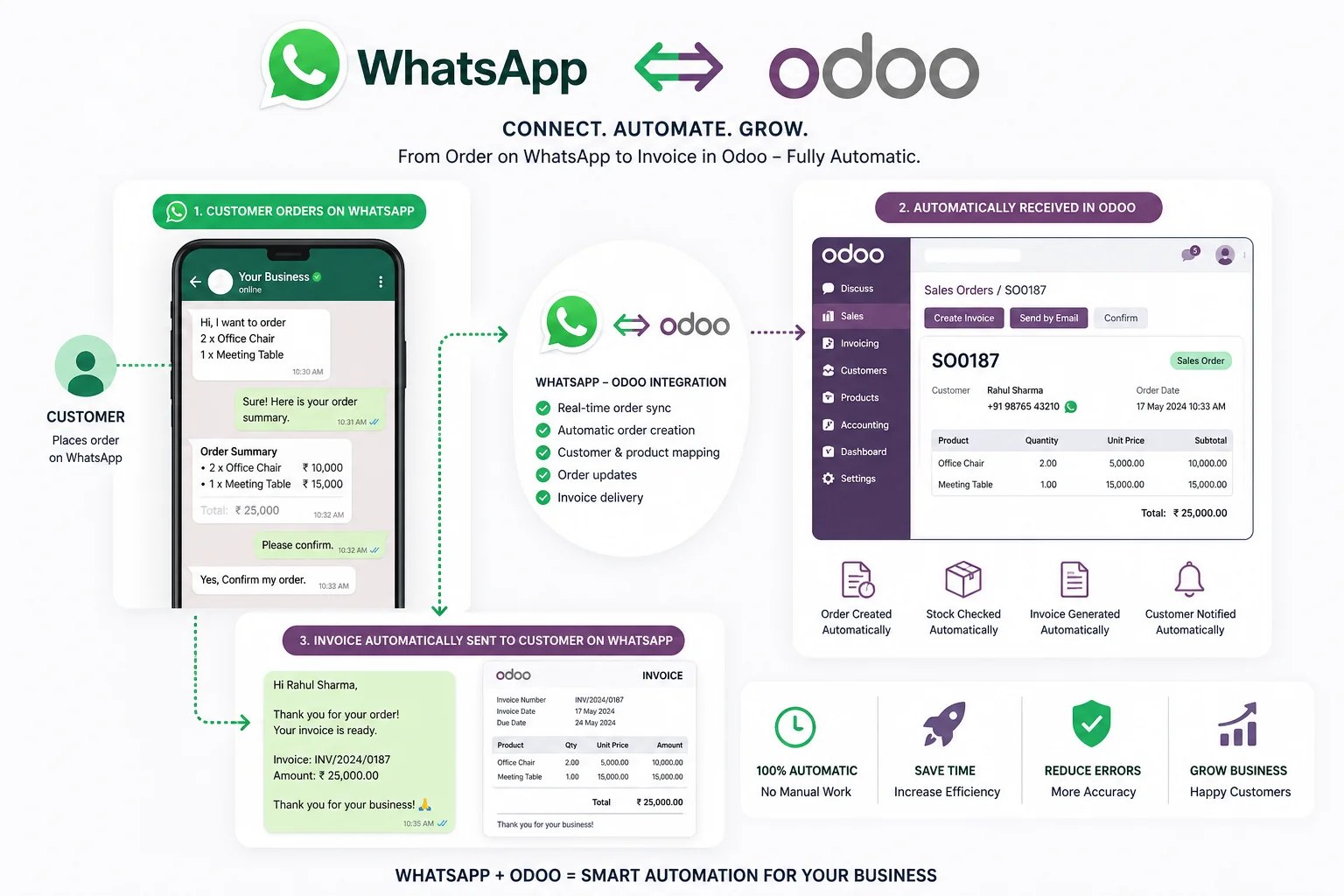
Go4whatsup is the best fit for most Odoo businesses: it works on Odoo Community and Enterprise (versions 15 to 20), connects Sales, Invoicing, Inventory, CRM and POS, sends order updates, invoices and payment reminders automatically with a shared inbox inside Odoo, and its team builds custom Odoo + WhatsApp workflows (11 published case studies). The Odoo + WhatsApp Complete plan is $79 a month ($49 a month for the first 3 months). Odoo’s own WhatsApp module suits Enterprise users who only need to send documents and templates.
- Go4whatsup: Odoo Community and Enterprise, versions 15 to 20
- Odoo + WhatsApp Complete: $79/month, $49/month for the first 3 months, no connector fee
- Odoo’s own WhatsApp app works on Enterprise only (Odoo documentation)
- 11 published Go4whatsup Odoo case studies
Quick answers
The 6 options, ranked
1. Go4whatsup
Best for: most Odoo businesses on Community or Enterprise, and anyone who needs a custom Odoo + WhatsApp workflow.
Works on Odoo Community and Enterprise, versions 15 to 20. Connects Sales, Invoicing, Inventory, CRM and POS: order confirmations, invoice PDFs, payment reminders and delivery updates go out automatically, with a shared inbox inside Odoo and auto-translate in 100+ languages. The team builds custom workflows; see the 11 case studies below. Odoo + WhatsApp Complete is $79 a month, $49 a month for the first 3 months, with no separate connector fee.
2. Odoo’s own WhatsApp module
Best for: Odoo Enterprise users who only need to send documents and templates from Odoo.
Odoo’s documentation says the WhatsApp app works on Odoo Enterprise and does not work in Odoo Community. It uses the official WhatsApp Business API, sends pre-approved templates such as quotations, invoices and POS receipts, and replies arrive in Discuss.
3. Webkul — All-in-one WhatsApp Livechat Integration
Best for: Community users who already pay for a WhatsApp API and want a one-time module.
The Odoo Apps listing shows $198.63 for versions 17 to 20, on Community, Enterprise and Odoo.sh. It needs a WhatsApp Business Account and a paid WhatsApp API subscription, and lets several users handle chats.
4. DevIntelle — Advanced WhatsApp Integration
Best for: Community users who want campaigns and a team chat workflow in Discuss.
The Odoo Apps listing shows $69 for version 19 (versions 17 and 18 are also listed), on Community, Enterprise and Odoo.sh, with the official Cloud API, agent transfer and auto-assignment in Discuss, bulk campaigns and chat-to-lead conversion.
5. Techspawn — WhatsApp Odoo Integration
Best for: very small teams testing WhatsApp from Odoo at no cost.
Free on the Odoo Apps store for versions 11 to 19. It connects by scanning a QR code on WhatsApp Web rather than through the official WhatsApp Business API.
6. WATI or Interakt (through a connector)
Best for: teams already on WATI or Interakt that can run a middleware tool.
Neither WATI’s nor Interakt’s pricing page lists an Odoo integration, and no WATI or Interakt module was found on the Odoo Apps store, so Odoo needs a third-party connector.
How the Odoo WhatsApp options compare
| Option | Community | Enterprise | Shared inbox | Auto-translate | Custom development | Price | Case studies |
|---|---|---|---|---|---|---|---|
| Go4whatsup | Yes (15–20) | Yes | Yes, inside Odoo | Yes, 100+ languages | Yes, in-house team | $79/month ($49 first 3 months) | 11 published |
| Odoo’s own module | No | Yes | Group chat in Discuss | Not stated | No | Part of Odoo Enterprise (per user) | — |
| Webkul | Yes | Yes | Several users handle chats | Not stated | Not stated | $198.63 one-time | — |
| DevIntelle | Yes | Yes | Agent transfer and auto-assign | Not stated | Not stated | $69 one-time (v19) | — |
| Techspawn | Yes | Yes | Not stated | Not stated | Not stated | Free (WhatsApp Web QR) | — |
| WATI / Interakt | No Odoo connector listed | No Odoo connector listed | Yes (in their own app) | — | — | Their plans + a connector | — |
Competitor facts from odoo.com documentation and each module’s apps.odoo.com listing, and from wati.io and interakt.shop pricing pages, checked November 2026. A module from Ksolves was not found on the Odoo Apps store, so it is not ranked. WhatsApp message charges are extra on every option; Go4whatsup bills Meta’s rate plus a platform margin.
Other 2026 rankings
- Best WhatsApp integrations for Zoho CRM
- Best WhatsApp apps for Shopify
- Best WhatsApp CRM 2026
- WhatsApp Business API providers compared
Custom Odoo + WhatsApp work, with case studies
The Go4whatsup team builds custom Odoo + WhatsApp workflows. See custom Odoo + WhatsApp development and the 11 published case studies:
Frequently asked questions
What is the best WhatsApp integration for Odoo?
For most Odoo businesses, Go4whatsup: it works on Community and Enterprise (15–20), connects Sales, Invoicing, Inventory, CRM and POS, and sends order updates, invoices and payment reminders automatically with a shared inbox inside Odoo. Odoo’s own module suits Enterprise users who only send documents and templates.
Does Go4whatsup work with Odoo Community?
Yes. Go4whatsup works on Odoo Community and Enterprise, versions 15 to 20, with no Enterprise licence and no Odoo Studio. Odoo’s own WhatsApp app works on Enterprise only.
How much does Go4whatsup cost for Odoo?
Odoo + WhatsApp Complete is $79 a month, $49 a month for the first 3 months, with no separate connector fee. WhatsApp message charges are separate, at Meta’s rate plus a platform margin.
Can Go4whatsup build a custom Odoo workflow?
Yes. The Go4whatsup team builds custom Odoo + WhatsApp workflows, such as invoice and payment flows, dispatch updates and AI document intake. Eleven are published as case studies.
WhatsApp inside Odoo
Odoo Community or Enterprise, live in about 24 hours once your Meta Business Manager is verified.
See Go4whatsup for Odoo Book a demoSee it running on your Odoo
Free onboarding on every paid plan. Typically live in 24 hours once your Meta Business Manager is verified.