Bulk WhatsApp campaigns from Zoho CRM and Zoho Campaigns
Go4whatsup broadcasts approved WhatsApp templates to any Zoho list or Zoho Campaigns segment, with template approval built in. Sends, opens, clicks and replies are reported back inside Zoho.
Broadcast to a Zoho list
Pick a Zoho CRM view or a Zoho Campaigns segment, choose an approved template and send. Go4whatsup fills each customer’s name and other fields from their Zoho record, sends from your business number and logs the message on every record that received it. Campaigns can go out immediately or be scheduled, and recurring sends such as daily order confirmations can run on their own.
Because the audience comes straight from Zoho, there is no exporting and re-importing of spreadsheets, and nobody is sent a message twice by mistake. Contacts are matched by phone number, one contact per number, and records without a number are skipped. Every recipient’s status is listed, so you can see who received, read or replied to the campaign.
Template approval inside the flow
Every broadcast uses a WhatsApp template approved by Meta. You create the template inside the app, with text, an image, video or document header and buttons, see a live preview of how it will look on the phone, and submit it for review without leaving Zoho. Approved, pending and rejected templates are listed with their status, and edits are re-reviewed by Meta before they go live.
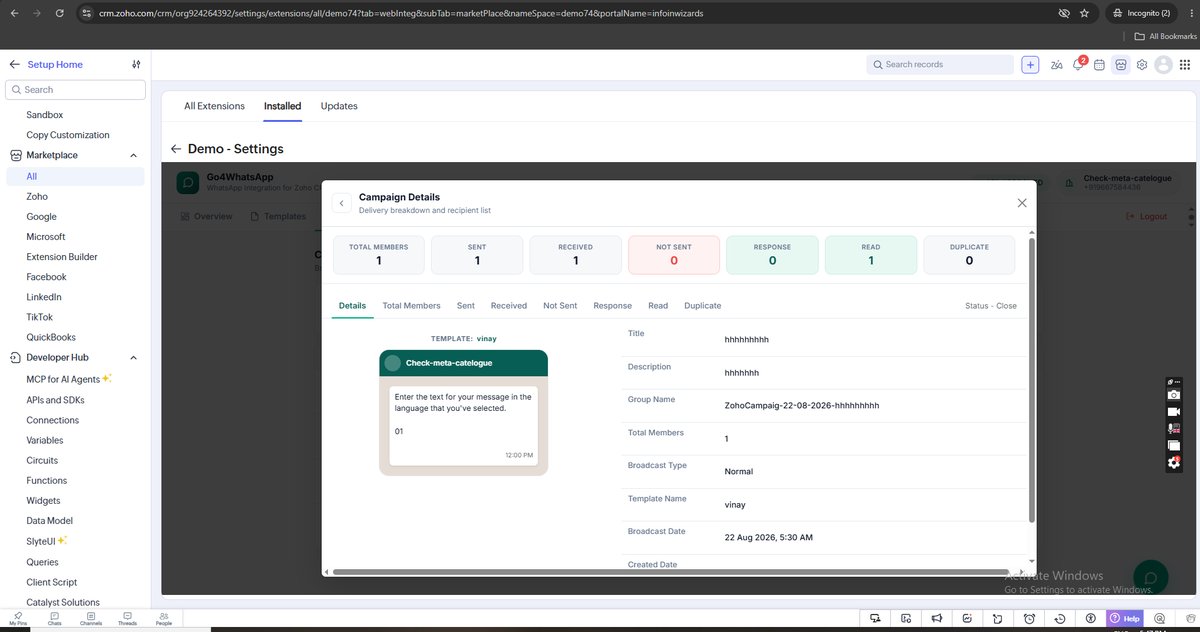
Reporting in Zoho Campaigns
For each campaign you see total members, sent, received, not sent, responses and reads, with a recipient list for every status. Sends, opens, clicks and replies are reported inside Zoho Campaigns, so WhatsApp sits next to your email results instead of in a separate tool. Replies land in the shared inbox, where the team can answer them.
Campaign ideas for Zoho teams
- Seasonal offers: Eid, Diwali or end-of-season offers to a Zoho Campaigns segment, with a button to reply or buy.
- Renewals: a reminder to customers whose contract or subscription ends this month, filtered from a Zoho view.
- Event invites: webinar or showroom invites with a date, a link and a reminder closer to the day.
- Re-engagement: a short message to leads that went quiet, with an easy way to reply.
- Order and service updates: Utility templates such as order confirmations that run every day on their own.
Keep each campaign to people who opted in and to a message they would want to receive. That keeps the number’s quality rating green and its sending limits high.
Opt-in and Meta rules
Marketing broadcasts need the customer’s opt-in, and Meta limits how many new customers a number can message each day based on its messaging tier and quality rating. Keeping a green quality rating means sending relevant templates to people who asked to hear from you. Contacts who unsubscribe stay unsubscribed when you sync from Zoho.
Marketing messages carry Meta’s Marketing rate per delivered message, plus a 7% Cloud API surcharge on Marketing only, and Go4whatsup bills Meta’s rate plus a platform margin. Utility templates, such as order updates, cost less.
Go4whatsup Standard is $39/month (AED 149 / SAR 149 / ₹1,499) with unlimited agents. The Free Forever plan covers 2 agents. The AI chatbot is an add-on on Standard, priced by AI usage, and included in Pro and Enterprise. WhatsApp message charges are separate: Meta’s per-message rate plus a platform margin, shown in the app before you send.
More on Zoho and WhatsApp
Put WhatsApp inside Zoho today
Install from Zoho Marketplace, connect with OAuth in about 5 minutes, and start on the Free Forever plan.
Install from Zoho Marketplace Start freeSee it running on your Zoho account
Free onboarding on every paid plan. Typically live in 24 hours once your Meta Business Manager is verified.
Frequently asked questions
Can I send bulk WhatsApp from Zoho CRM?
Yes. Go4whatsup broadcasts approved WhatsApp templates to any Zoho CRM list or Zoho Campaigns segment.
Do templates need Meta approval?
Yes. Every broadcast template is approved by Meta; you create and submit it inside the app.
Where do I see results?
Inside Zoho: sends, opens, clicks and replies are reported in Zoho Campaigns, with per-campaign counts for sent, received, responses and reads.
Is there a sending limit?
Meta sets daily limits on how many new customers a number can message, based on its messaging tier and quality rating.