Zoho CRM WhatsApp automation
Go4whatsup sends the right WhatsApp message when a Zoho deal changes stage: an intro when qualified, the quote with PDF when a proposal is sent, a follow-up in negotiation and an onboarding pack when closed won. Meeting reminders go out before each Zoho calendar event.
Deal stage → message
Every stage change can fire the matching WhatsApp template, so the customer is kept in the loop without a rep touching the keyboard:
- Qualified → warm intro template
- Proposal sent → quote with the PDF attached
- Negotiation → follow-up cadence
- Closed Won → onboarding and welcome pack
Rules are set per Zoho module. Go4whatsup watches Zoho records as they are created and edited, and a template is sent automatically when a record matches every condition of a rule. Each rule can add follow-ups, for example a second message after one hour and a third an hour later if the customer has not replied.
Meeting reminders with reschedule button
Meeting reminders go out on WhatsApp before each Zoho calendar event, with the time, the meeting link and a button to reschedule. Customers who cannot make it can say so in one tap, instead of simply not turning up, and the rep sees the reply on the record.
New number → new Lead (your rules)
When a number that is not yet a Lead or Contact in Zoho CRM messages you, Go4whatsup can create a Lead with the WhatsApp name, number and first message. Your auto-send rules for new Leads then apply as usual. Contacts and Leads can also be synced from Zoho into Go4whatsup: everything, only what changed since the last sync, or records created between two dates. Syncing sends nothing, and contacts who unsubscribed stay unsubscribed.
Example: one deal, start to finish
A prospect messages your business number. Go4whatsup creates a Lead with their WhatsApp name, number and first message, and your welcome rule replies within seconds. A rep qualifies the lead and moves the deal to Qualified; the intro template goes out automatically. The rep books a call in Zoho, and the meeting reminder arrives on WhatsApp before it, with a reschedule button.
After the call the deal moves to Proposal sent, and the quote PDF arrives on WhatsApp. In Negotiation, follow-ups go out if the customer goes quiet. When the deal is Closed Won, the onboarding pack is sent. Every message is logged on the record, and the rep only typed when a real conversation was needed.
Working hours, holidays and auto-translate
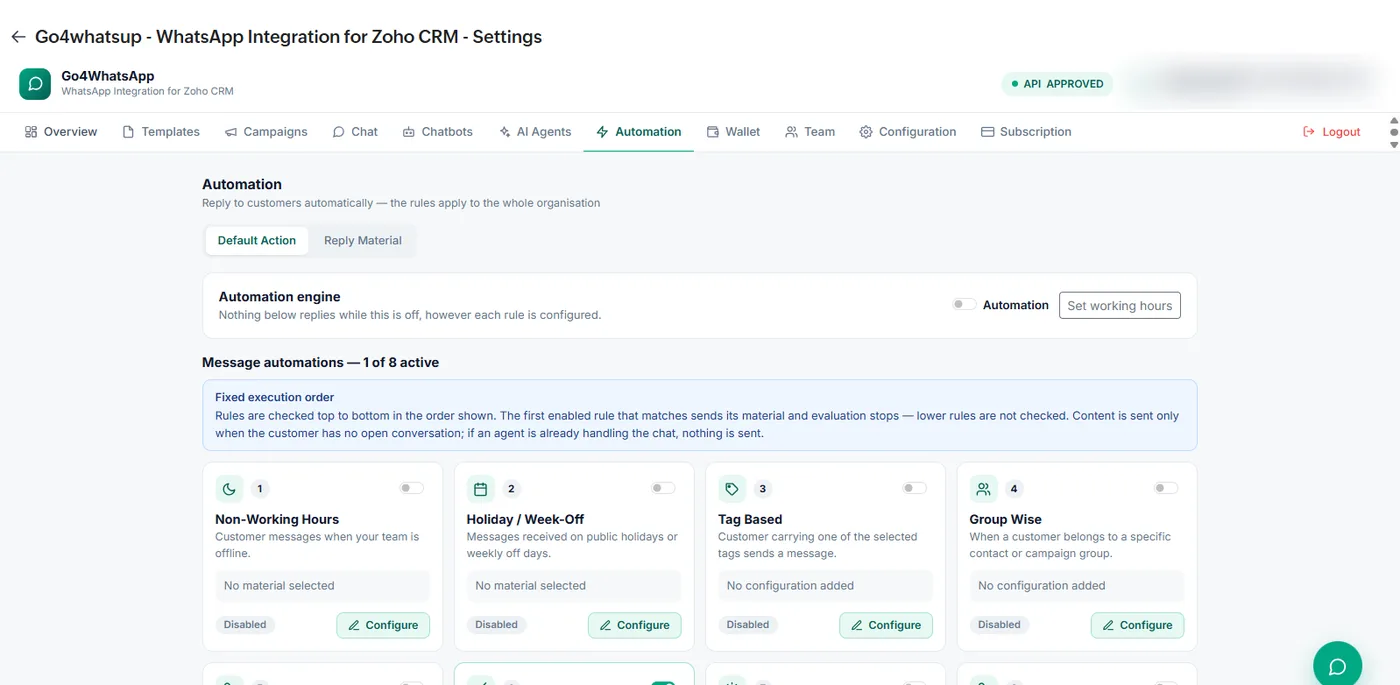
Inbound automation runs on your working hours. Separate rules cover messages that arrive outside working hours, on public holidays or weekly off days, from customers with a particular tag, or from a specific contact group. Rules are checked top to bottom; the first one that matches sends its message, and nothing is sent if an agent is already handling the chat.
Auto-translate covers 100+ languages, so automated and manual replies reach Arabic and Hindi speakers in their own language. No Zoho Flow is needed for any of this; the rules live inside the Go4whatsup extension.
Go4whatsup Standard is $39/month (AED 149 / SAR 149 / ₹1,499) with unlimited agents. The Free Forever plan covers 2 agents. The AI chatbot is an add-on on Standard, priced by AI usage, and included in Pro and Enterprise. WhatsApp message charges are separate: Meta’s per-message rate plus a platform margin, shown in the app before you send.
More on Zoho and WhatsApp
Put WhatsApp inside Zoho today
Install from Zoho Marketplace, connect with OAuth in about 5 minutes, and start on the Free Forever plan.
Install from Zoho Marketplace Start freeSee it running on your Zoho account
Free onboarding on every paid plan. Typically live in 24 hours once your Meta Business Manager is verified.
Frequently asked questions
Can Zoho CRM send WhatsApp messages automatically?
Yes. Go4whatsup sends an approved WhatsApp template automatically when a Zoho CRM record matches the conditions of a rule, with optional follow-ups.
Can I trigger messages on deal stage?
Yes. For example: Qualified sends an intro, Proposal sent sends the quote PDF, Negotiation sends follow-ups and Closed Won sends the onboarding pack.
Can it send meeting reminders?
Yes. Reminders go out on WhatsApp before each Zoho calendar event, with a reschedule button.
Do I need Zoho Flow?
No. The rules run inside the Go4whatsup extension for Zoho; Zoho Flow is optional.