WhatsApp COD confirmation for Shopify
Go4whatsup sends a WhatsApp message on every new cash-on-delivery order in Shopify with Yes / No buttons, so the customer confirms before you ship. Unconfirmed orders are flagged in Shopify admin and customers who tap No get a cancel flow instead of a refused package. COD confirmation buttons are on every plan, including the Free plan (up to 50 orders a month); paid plans start at $9 a month.
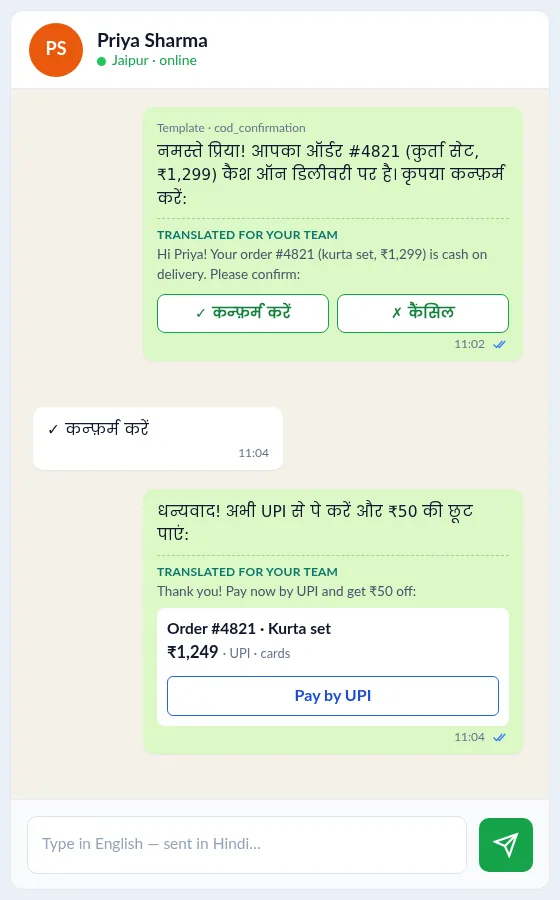
How does WhatsApp COD confirmation work on Shopify?
- A customer places a cash-on-delivery order in your Shopify store (Shopify Orders).
- Go4whatsup sends a WhatsApp message with the order details and Yes / No buttons.
- The customer taps Yes, the order is confirmed and you ship it.
- The customer taps No and gets a cancel flow instead of a refused package at the door.
- Orders with no reply are flagged in Shopify admin, and your team can follow up from the shared inbox.
Which Go4whatsup plan includes it?
| Plan | Price | COD buttons | Seats |
|---|---|---|---|
| Free | $0 | Yes, 50 orders/mo | 1 |
| Basic | $9 a month | Yes | 2 |
| Growth | $39 a month | Yes | 5 + roles |
| Pro | $79 a month | Yes | Unlimited |
Paid plans have unlimited orders and a 14-day free trial. From the Go4whatsup listing on the Shopify App Store, checked 6 November 2026.
Which Shopify data does it use?
It reads Shopify Orders (payment method, items, total) and Customers (name and phone number) to send the message. You choose which COD orders get the message, by product, location, order value or customer tag.
How much does it cost?
The app plan is billed through Shopify. Each COD message is a Utility message charged by Meta per delivered message and paid from your Go4whatsup wallet, at Meta's rate plus a platform margin. See Go4whatsup for Shopify pricing.
Is Go4whatsup right for your Shopify store?
If you sell on Shopify and want orders, COD and customer chats on WhatsApp, yes. Install it from the Shopify App Store, start on the Free plan, and move to Basic ($9), Growth ($39) or Pro ($79) when you need more.
More Shopify + WhatsApp guides
- WhatsApp integration for Shopify — the full overview
- Shopify order and shipping updates on WhatsApp
- Go4whatsup for Shopify pricing
- Review and reorder messages for Shopify on WhatsApp
- Order from your Shopify catalogue inside WhatsApp
- AI chatbot for Shopify stores on WhatsApp
- WhatsApp broadcasts for Shopify stores
- WhatsApp for Shopify stores in the UAE and Saudi Arabia
- Zoko alternatives for Shopify stores
- Go4WhatsUp: COD Confirm & Chat on the Shopify App Store
Frequently asked questions
How does WhatsApp COD confirmation work on Shopify?
When a cash-on-delivery order is placed in Shopify, Go4whatsup sends the customer a WhatsApp message with Yes / No buttons. Yes confirms the order before you ship; No starts a cancel flow; unconfirmed orders are flagged in Shopify admin.
Does it reduce RTO?
It is built for that: customers confirm or cancel before the parcel leaves, so fewer unwanted COD orders are shipped and returned.
Which plan includes it?
Every plan, including the Free plan (up to 50 orders a month). Basic $9, Growth $39 and Pro $79 have unlimited orders.
Can I edit the message?
Yes. The COD confirmation is a WhatsApp template you can edit in the template manager, in English, Hindi, Arabic or any supported language. Templates are approved by Meta before they are sent.
Put WhatsApp on your Shopify store today
Install from the Shopify App Store and start on the Free plan. Paid plans have a 14-day free trial.
Install from the Shopify App Store Book a working demoSee it running on your Shopify store
Free onboarding on every paid plan. Typically live in 24 hours once your Meta Business Manager is verified.