WhatsApp broadcasts for Shopify stores
From the Growth plan, Go4whatsup sends WhatsApp broadcasts and promotional messages to Shopify customer segments (launches, restocks, festival collections), with campaign analytics for every send.
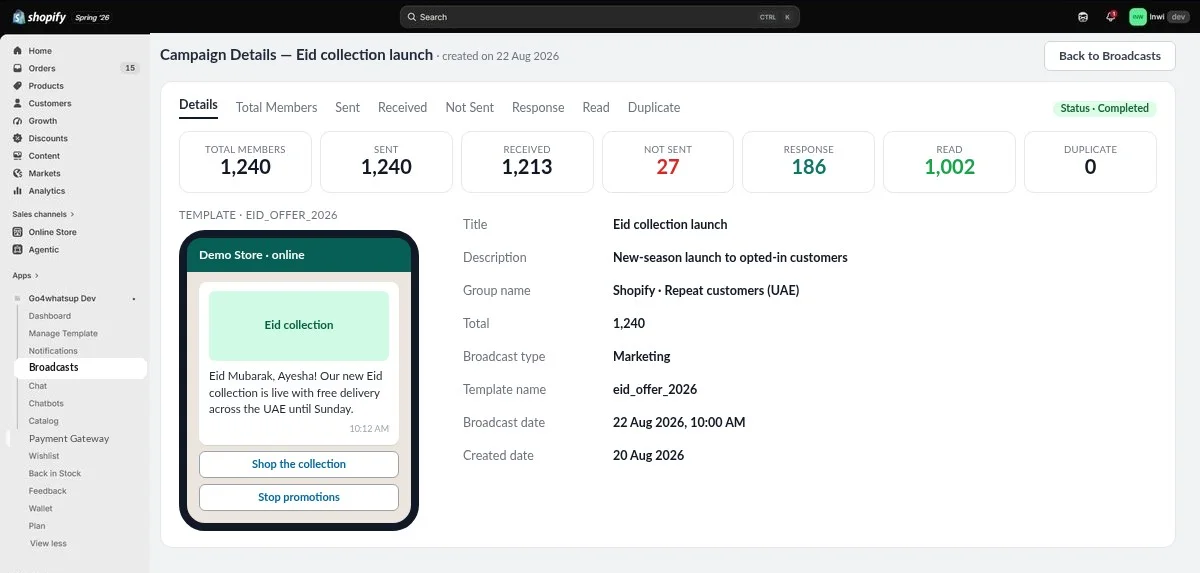
How do WhatsApp broadcasts for Shopify work?
- Pick a Shopify customer segment, for example repeat customers or a tag.
- Choose a Meta-approved marketing template and add the products or offer.
- Schedule the broadcast or send it now.
- Go4whatsup sends it and tracks sent, received, read and responses.
- Replies land in your shared team inbox, and campaign analytics show template- and campaign-level results.
Which Go4whatsup plan includes it?
| Plan | Price | Broadcasts | Seats |
|---|---|---|---|
| Free | $0 | No | 1 |
| Basic | $9 a month | No | 2 |
| Growth | $39 a month | Yes | 5 + roles |
| Pro | $79 a month | Yes | Unlimited |
Paid plans have unlimited orders and a 14-day free trial. From the Go4whatsup listing on the Shopify App Store, checked 6 November 2026.
Which Shopify data does it use?
Broadcasts use Shopify Customers (tags, purchases and activity) for segments and Products for the offer, and only go to customers who opted in to WhatsApp messages.
How much does a broadcast cost?
Each broadcast message is a Marketing message, charged by Meta per delivered message and paid from your wallet at Meta's rate plus a platform margin; an extra 7% applies to Marketing messages.
Is Go4whatsup right for your Shopify store?
If you sell on Shopify and want orders, COD and customer chats on WhatsApp, yes. Install it from the Shopify App Store, start on the Free plan, and move to Basic ($9), Growth ($39) or Pro ($79) when you need more.
More Shopify + WhatsApp guides
- WhatsApp integration for Shopify — the full overview
- Review and reorder messages for Shopify on WhatsApp
- AI chatbot for Shopify stores on WhatsApp
- WhatsApp COD confirmation for Shopify
- Shopify order and shipping updates on WhatsApp
- Go4whatsup for Shopify pricing
- Order from your Shopify catalogue inside WhatsApp
- WhatsApp for Shopify stores in the UAE and Saudi Arabia
- Zoko alternatives for Shopify stores
- Go4WhatsUp: COD Confirm & Chat on the Shopify App Store
Frequently asked questions
Can I send WhatsApp campaigns to Shopify customers?
Yes. From the Growth plan you can send broadcasts and promotional messages to Shopify customer segments who opted in.
How is revenue tracked?
Campaign analytics in Go4whatsup show template- and campaign-level results, and revenue from abandoned-cart recovery is tagged in Shopify Analytics.
Do messages need Meta approval?
Yes. Broadcasts use marketing templates that Meta approves before you send them; you create and track them in the template manager.
Which plan includes it?
Growth ($39) and Pro ($79).
Put WhatsApp on your Shopify store today
Install from the Shopify App Store and start on the Free plan. Paid plans have a 14-day free trial.
Install from the Shopify App Store Book a working demoSee it running on your Shopify store
Free onboarding on every paid plan. Typically live in 24 hours once your Meta Business Manager is verified.