Shared WhatsApp inbox inside Zoho
Go4whatsup gives your whole Zoho team one WhatsApp number with a shared inbox, agent assignment, round-robin routing and SLAs. Each chat matches the right Lead, Contact, Deal or Account by phone number, and media files sync back as Zoho attachments.
One number, unlimited agents
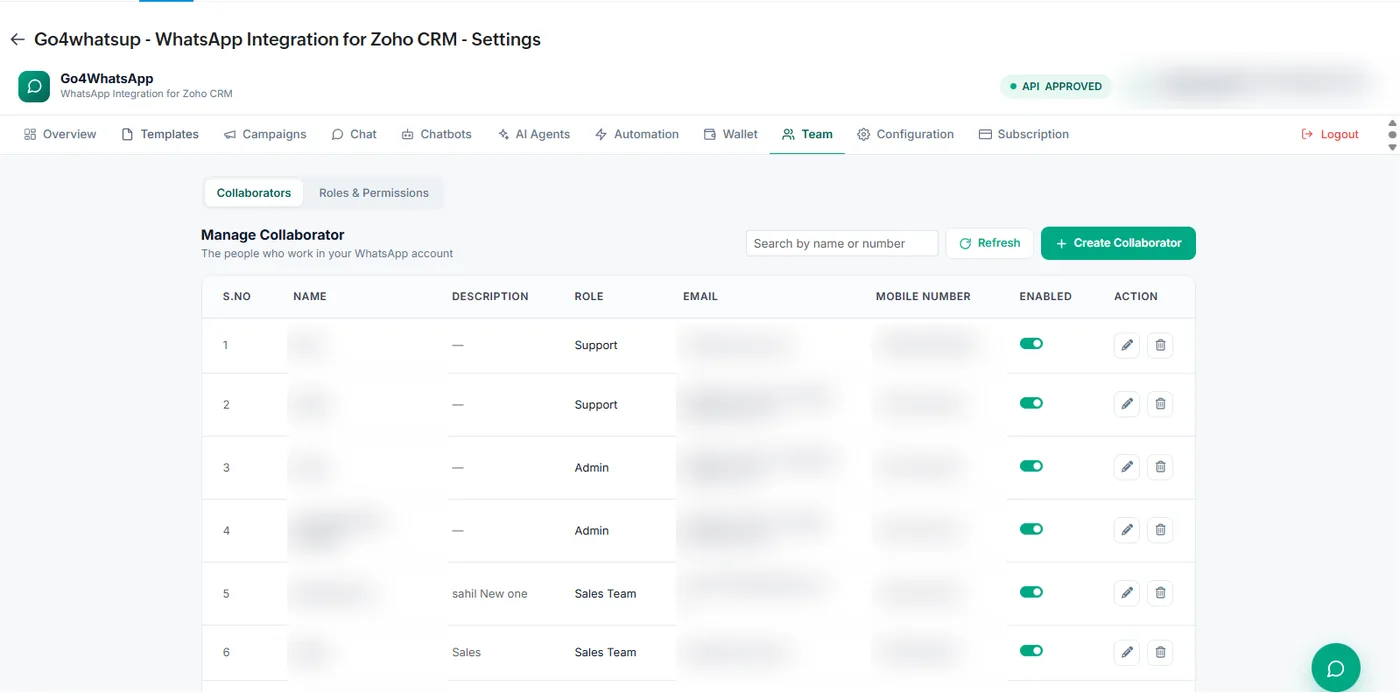
Most Zoho teams start with WhatsApp on one person’s phone. Go4whatsup moves the conversation to one business number on the official WhatsApp Business API, shared by the whole team inside Zoho. On Standard there is no per-seat bill: add sales, support and branch staff as collaborators, each with a role such as Support, Admin or Sales Team, and permissions per role.
Roles decide what each person can see and do, so branch staff can answer their own customers while admins manage templates, campaigns and settings for the whole account.
Assignment and round-robin
New chats are assigned to a person or spread across the team with round-robin routing, and SLAs keep response times visible. Each chat has one owner, so two reps never answer the same customer.
Working-hours rules sit on top of routing: outside hours, on holidays or weekly off days, customers get an automatic reply and the chat waits in the inbox for the next person on shift. Automatic messages are only sent when no agent is already handling the conversation, so customers never get a bot reply in the middle of a real chat.
Auto-matching to Zoho records
Every message lands on the right Zoho record automatically. Go4whatsup matches Leads, Contacts, Deals and Accounts by phone number, keeps the full chat history on the record timeline and syncs media files back as Zoho attachments. A number that is not yet in Zoho can create a new Lead with its WhatsApp name, number and first message, following your rules.
Before and after
Before: each rep uses WhatsApp on their own phone. Leads are scattered across devices, nobody knows who already answered, and when a rep leaves, their chats leave too. Managers cannot see response times, and Zoho shows nothing of what was said.
After: one business number, one shared inbox inside Zoho. New chats are assigned automatically, every conversation sits on the right Zoho record, and managers can see who replied and when. Support, sales and branch staff work side by side with their own roles, and adding a new hire to WhatsApp is a few clicks with no extra licence on Standard.
Audit log
Message activity shows in the Zoho audit log, so managers can see who replied, what was sent and when. When a rep leaves, the conversations stay with the business number and the Zoho records, not on a personal phone.
Replies can be a template or a freeform message while the customer’s 24-hour window is open, and auto-translate covers 100+ languages. AI-drafted replies and the AI chatbot are an add-on on Standard, priced by AI usage, and included in Pro and Enterprise.
Go4whatsup Standard is $39/month (AED 149 / SAR 149 / ₹1,499) with unlimited agents. The Free Forever plan covers 2 agents. The AI chatbot is an add-on on Standard, priced by AI usage, and included in Pro and Enterprise. WhatsApp message charges are separate: Meta’s per-message rate plus a platform margin, shown in the app before you send.
More on Zoho and WhatsApp
Put WhatsApp inside Zoho today
Install from Zoho Marketplace, connect with OAuth in about 5 minutes, and start on the Free Forever plan.
Install from Zoho Marketplace Start freeSee it running on your Zoho account
Free onboarding on every paid plan. Typically live in 24 hours once your Meta Business Manager is verified.
Frequently asked questions
Can my whole team use one WhatsApp number in Zoho?
Yes. Go4whatsup gives the whole team one WhatsApp number with a shared inbox inside Zoho, with unlimited agents on Standard.
How are chats assigned?
By agent assignment or round-robin routing, with SLAs, so each chat has one owner.
Are WhatsApp chats saved in Zoho?
Yes. The full chat history stays on the matched Lead, Contact, Deal or Account, and media files sync back as Zoho attachments.
What happens with a new number?
A number that is not yet in Zoho can create a new Lead automatically with its WhatsApp name, number and first message, following your rules.