Zoho native WhatsApp vs Go4whatsup
Zoho CRM has its own WhatsApp option. Go4whatsup adds a shared team inbox with routing and SLAs, AI replies (an add-on on Standard), auto-translate in 100+ languages, broadcasts to Zoho lists, coverage across five Zoho apps and the option to keep your existing WhatsApp number, for a flat $39 a month with unlimited agents.
Side-by-side
| Capability | Zoho native WhatsApp | Go4whatsup |
|---|---|---|
| Agents on WhatsApp | Tied to Zoho CRM user licences | Unlimited, $39 flat |
| Shared team inbox with assignment | Basic | Yes, with routing and SLAs |
| AI auto-reply and drafted replies | No | Yes (add-on on Standard) |
| Auto-translate customer ↔ agent | No | 100+ languages |
| Broadcasts to Zoho lists | Limited | Yes, with template approval built in |
| Apps covered | Zoho CRM (other Zoho apps set up WhatsApp separately) | CRM, Desk, Books, SalesIQ, Campaigns |
| Existing WhatsApp number | Number can’t be in use on another WhatsApp tool | Can migrate your number |
When Zoho native is enough
If one or two people send occasional WhatsApp messages from Zoho CRM records, you only use Zoho CRM (not Desk, Books or Campaigns), and you are happy to register a brand-new number with Meta, Zoho’s own WhatsApp option can be enough. It keeps everything in one vendor and needs no extra extension.
When teams add Go4whatsup
Teams add Go4whatsup when WhatsApp becomes a team channel rather than a personal one. Several reps answer the same number, so chats need assignment, round-robin routing and SLAs. Customers write in Arabic or Hindi, so replies need auto-translate. Marketing wants to broadcast approved templates to Zoho lists and see results inside Zoho Campaigns. Support wants WhatsApp messages to open Zoho Desk tickets, and finance wants Zoho Books invoices to go out as WhatsApp PDFs.
Pricing is the other reason. Native WhatsApp follows Zoho user licences, so every new agent adds cost. On Go4whatsup Standard the fee is $39 a month for unlimited agents. The AI chatbot is an add-on on Standard, priced by AI usage, and included in Pro and Enterprise.
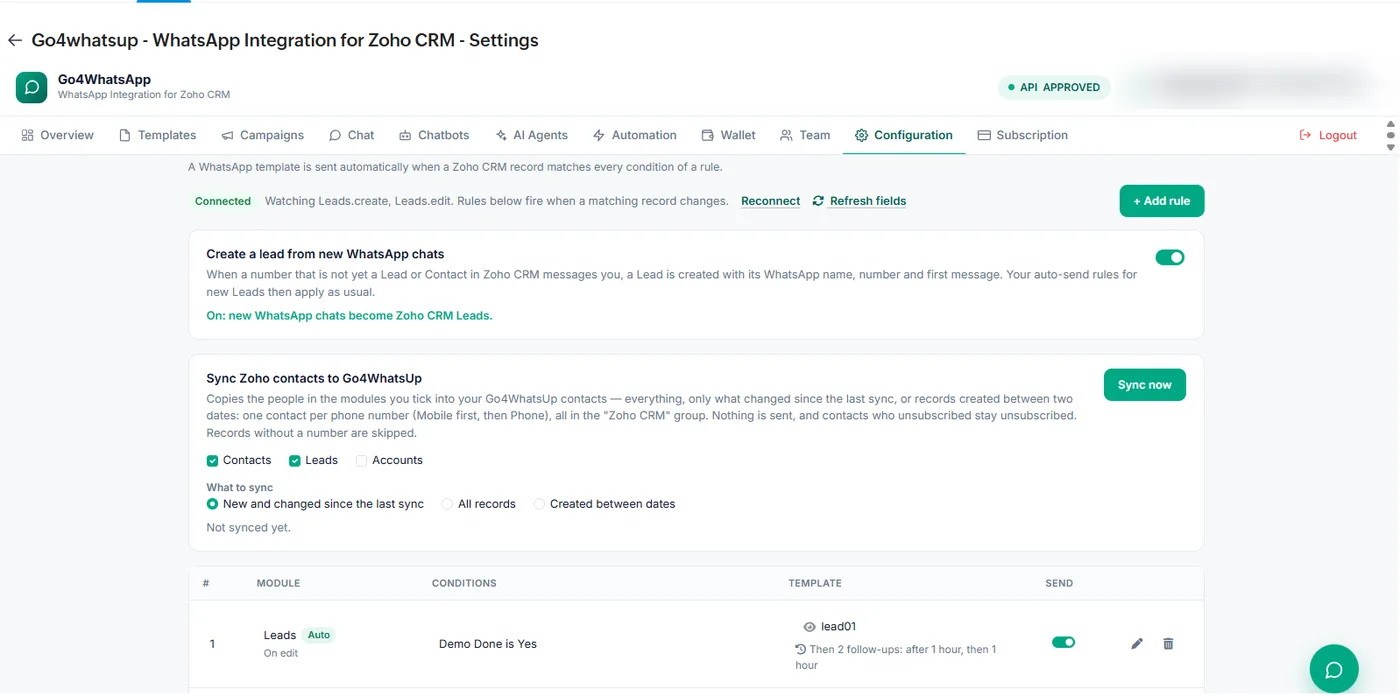
Go4whatsup also handles the record side: a WhatsApp chat from a number that is not yet in Zoho can create a Lead automatically with the WhatsApp name, number and first message, and your auto-send rules then apply to that Lead as usual.
Questions to ask before you choose
- How many people will answer WhatsApp? If more than one or two, per-licence pricing adds up and a shared inbox with assignment matters.
- Which Zoho apps do you use? If support runs in Desk or invoices go out from Books, you need WhatsApp in those apps too, not only in CRM.
- Do customers write in another language? Auto-translate lets one team serve Arabic, Hindi and English speakers.
- Do you want to keep your number? Customers already save it; changing it means lost chats.
- Will marketing broadcast to Zoho lists? Then template approval and campaign reporting inside Zoho save time.
If most answers point to a team channel, Go4whatsup is the better fit. If they point to one person sending the odd message from Zoho CRM, native is simpler.
How to switch in 5 minutes (OAuth)
- Install Go4whatsup from Zoho Marketplace and approve the OAuth connection.
- Connect your WhatsApp Business API number, or migrate the number you already use.
- Choose which Zoho modules to sync (Contacts, Leads, Accounts) and turn on lead creation from new chats.
- Add your team as collaborators with roles, then send your first approved template from a Zoho record.
Most teams are connected in about five minutes. Free onboarding help is included on every paid plan.
More on Zoho and WhatsApp
Put WhatsApp inside Zoho today
Install from Zoho Marketplace, connect with OAuth in about 5 minutes, and start on the Free Forever plan.
Install from Zoho Marketplace Start freeSee it running on your Zoho account
Free onboarding on every paid plan. Typically live in 24 hours once your Meta Business Manager is verified.
Frequently asked questions
Does Zoho CRM have built-in WhatsApp?
Yes, Zoho CRM has its own WhatsApp option. It is billed per Zoho user licence, covers CRM only and needs a number that is new to Meta. Go4whatsup adds a shared inbox with routing, auto-translate, AI replies as an add-on and five Zoho apps for $39 a month with unlimited agents.
Can I keep my current WhatsApp number?
Yes. Go4whatsup can migrate the WhatsApp number you already use; Zoho native requires a new one.
Can several reps share one WhatsApp number in Zoho?
Yes. Go4whatsup gives the whole team one number with a shared inbox, assignment and round-robin routing, with unlimited agents on Standard.
Does it work outside Zoho CRM?
Yes. It works across Zoho CRM, Desk, Books, SalesIQ and Campaigns.