How to integrate WhatsApp with Zoho CRM
There are three ways to connect WhatsApp to Zoho CRM: Zoho CRM’s built-in WhatsApp Business integration, a Zoho Marketplace extension that runs on the official WhatsApp Business API, such as Go4whatsup, or a tool that syncs an existing WhatsApp number by QR code. For a team that wants one shared business number, approved templates, bulk campaigns and WhatsApp across Zoho CRM, Desk and Books, Go4whatsup is built for it: $39/month on the Standard plan with unlimited agents, installed from Zoho Marketplace.
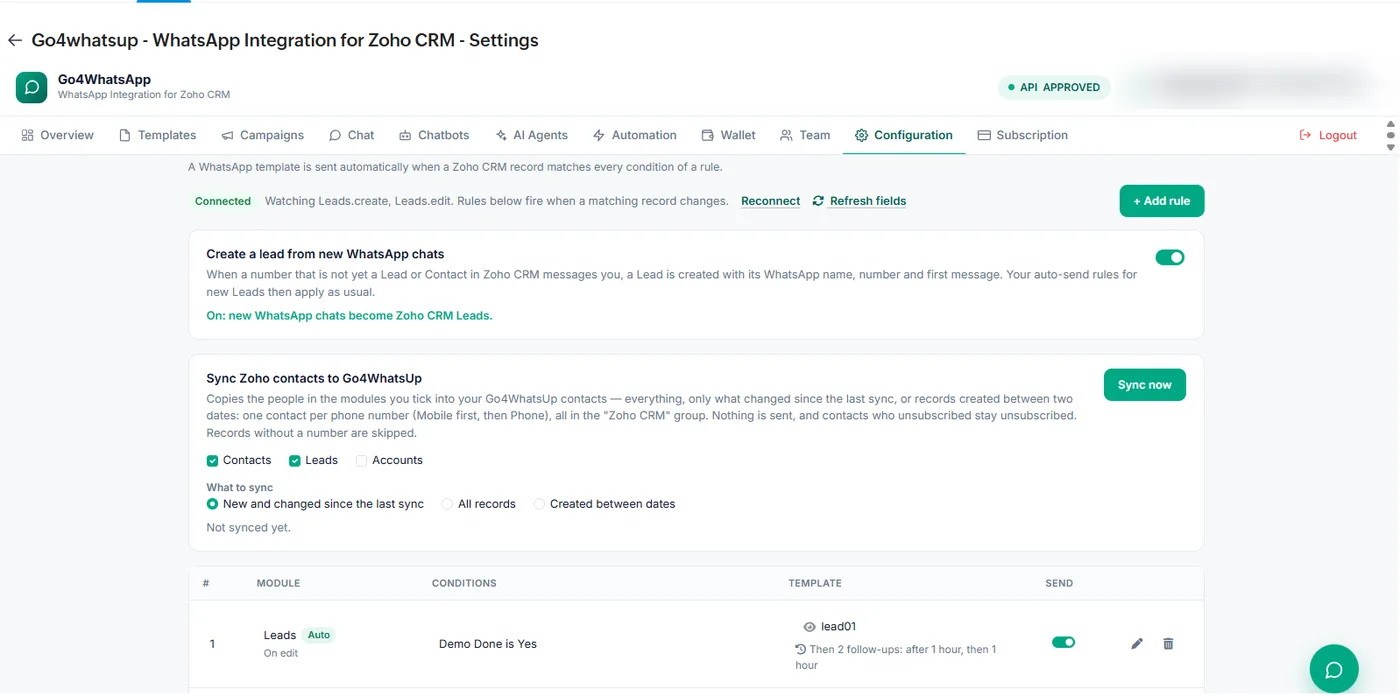
What are the three ways to connect WhatsApp to Zoho CRM?
| Route | How it connects | Best for | Watch out for |
|---|---|---|---|
| Zoho CRM’s built-in WhatsApp | Setup > Channels > Business Messaging > WhatsApp, on the official WhatsApp Business API | Chatting with leads and contacts from Zoho CRM records | Admin-only setup; needs a Facebook Business Manager, a verified business and a WhatsApp Business account; Zoho Desk and Books are set up separately |
| Zoho Marketplace extension on the official API (Go4whatsup) | Installed from Zoho Marketplace, connected with Zoho OAuth | Teams that want one shared number, templates, campaigns and automation across Zoho CRM, Desk and Books | Pricing differs a lot between providers: per seat or flat, and what is included |
| QR-code sync tools | Link an existing WhatsApp number by scanning a QR code; messages are logged in Zoho | One-to-one chats from staff numbers | Not the official WhatsApp Business API, so no Meta-approved templates for bulk messages; WhatsApp’s terms do not allow bulk or automated messaging from the regular apps |
Other WhatsApp providers, such as Gallabox and Tellephant, also list Zoho CRM extensions on Zoho Marketplace. Compare them on the points below before you choose.
How do you set up the Go4whatsup Zoho CRM integration?
- Get a WhatsApp Business API number. Go4whatsup is a Meta Business Partner and sets up the WhatsApp Business API for you; you are typically live within 24 hours once your Meta Business Manager is verified.
- Install Go4whatsup from Zoho Marketplace. Open the Go4whatsup listing on Zoho Marketplace and install it on your Zoho CRM org. It works on Professional, Enterprise, Ultimate, CRM Plus and Zoho One.
- Connect with Zoho OAuth. Sign in with a Zoho admin account and approve access to Leads, Contacts, Deals, Notes and Activities. You can revoke it at any time.
- Pick your Zoho apps and map fields. Choose what syncs (Zoho CRM, Desk, Books) and map phone, name, owner and any custom fields you use for routing.
- Set your triggers. Choose what sends a WhatsApp message: a deal-stage change, a new lead, an invoice in Zoho Books or a new Zoho Desk ticket.
- Send a test message. Send a test chat. The conversation appears on the right Zoho record, and your team replies from the shared inbox.
Connecting takes about 5 minutes. If you book a demo, our engineer maps fields and sets triggers with you on the call.
Which WhatsApp API works best with Zoho CRM?
Any official WhatsApp Business API provider with a Zoho CRM extension will work. The differences are in what you get around it. Check these five things:
- Which Zoho apps it covers. Go4whatsup works with Zoho CRM, Desk, Books, SalesIQ and Campaigns on one number. Zoho Bigin is not supported.
- How it is priced. Go4whatsup Standard is $39/month with unlimited agents, so the price does not grow as you add reps. A Free Forever plan covers 2 agents.
- Team inbox. A shared inbox with assignment, so one business number serves the whole team inside Zoho.
- Campaigns and automation. Approved templates, bulk campaigns to Zoho lists and views, and messages triggered by deal stages, invoices and tickets.
- AI. The Go4whatsup AI chatbot is an add-on on Standard, priced by AI usage, and included in Pro and Enterprise.
What does WhatsApp for Zoho CRM cost?
There are two parts. The Go4whatsup platform fee is $39/month on Standard with unlimited agents. WhatsApp message charges are separate: Meta charges per delivered template message by category and country, and Go4whatsup bills Meta’s per-message rate plus a platform margin, shown in the app before you send. From 1 October 2026 each number gets 1,000 free Service messages a month. See Zoho CRM WhatsApp integration pricing and Go4whatsup plans.
Which Zoho teams use Go4whatsup?
- Al Rawan Travel — Zoho CRM: every quote request on WhatsApp logs a deal stage for the right agent.
- Nour Retail — Zoho CRM and Zoho Desk: every WhatsApp conversation syncs to the customer’s profile.
- SkillLab Academy — Zoho CRM logs every WhatsApp touchpoint, so counsellors stop updating records by hand.
Is Go4whatsup right for your Zoho team?
If you run sales, support or billing in Zoho and want it all on one WhatsApp business number, yes. Install it from Zoho Marketplace, start on the Free Forever plan, and move to Standard at $39/month with unlimited agents when your team is ready.
More on Zoho and WhatsApp
- WhatsApp integration for Zoho CRM — overview
- Zoho CRM WhatsApp integration pricing
- Zoho native WhatsApp vs Go4whatsup
- WhatsApp for Zoho Desk
- Zoho Books invoices and payment reminders on WhatsApp
- Zoho CRM WhatsApp automation
- Bulk WhatsApp campaigns from Zoho CRM and Zoho Campaigns
- Shared WhatsApp inbox inside Zoho
- WhatsApp for Zoho CRM in the UAE and Saudi Arabia
- The Go4whatsup Zoho CRM extension
- Go4whatsup on Zoho Marketplace
Frequently asked questions
Does Zoho CRM have a built-in WhatsApp integration?
Yes. Zoho CRM has a built-in WhatsApp Business integration under Setup > Channels > Business Messaging (Instant Messaging on older accounts). An administrator sets it up, and it needs a Facebook Business Manager account, a verified business and a WhatsApp Business account. Go4whatsup adds a shared team inbox, bulk campaigns, automation and WhatsApp for Zoho Desk and Books on the same number.
Do I need the WhatsApp Business API to use WhatsApp with Zoho CRM?
For a shared business number, approved templates and bulk campaigns, yes. Zoho’s built-in option and Marketplace extensions such as Go4whatsup run on the official WhatsApp Business API. Tools that link a regular WhatsApp number by QR code do not use the API.
Is there a free WhatsApp integration for Zoho CRM?
Go4whatsup has a Free Forever plan for 2 agents with no credit card. The Standard plan is $39/month with unlimited agents. Meta’s WhatsApp message charges are separate and billed per message.
Which WhatsApp API works with Zoho CRM?
Any official WhatsApp Business API provider with a Zoho CRM extension. Go4whatsup installs from Zoho Marketplace, works across Zoho CRM, Desk, Books, SalesIQ and Campaigns, and includes a shared inbox with unlimited agents for $39/month.
Does Go4whatsup work with Zoho Bigin?
No. Go4whatsup works with Zoho CRM, Zoho Desk, Zoho Books, Zoho Campaigns and Zoho SalesIQ. Zoho Bigin is not supported.
Can the same WhatsApp number work in Zoho Desk and Zoho Books?
Yes. With Go4whatsup, one business number handles Zoho CRM leads and deals, Zoho Desk tickets and Zoho Books invoices and payment reminders.
Put WhatsApp inside Zoho today
Install from Zoho Marketplace, connect with OAuth in about 5 minutes, and start on the Free Forever plan.
Install from Zoho Marketplace Start freeSee it running on your Zoho account
Free onboarding on every paid plan. Typically live in 24 hours once your Meta Business Manager is verified.