Go4whatsup for Odoo · Template management
Odoo WhatsApp templates — create, approve, preview and test every WhatsApp message without leaving Odoo.
Every business message on the WhatsApp Business API outside the 24-hour window needs a Meta-approved template. Go4whatsup puts template management inside Odoo: start from a library of ready-made samples, see each template’s type, category and Meta status at a glance, preview it live exactly as the customer will see it, test it on a real phone, and map its variables to Odoo fields so one template speaks to every customer by name.
Odoo + WhatsApp Complete · $79/month, $49/month for the first 3 months · Unlimited agents · Works on Odoo Community and Enterprise.
The short answer
Template management in Odoo, in four parts
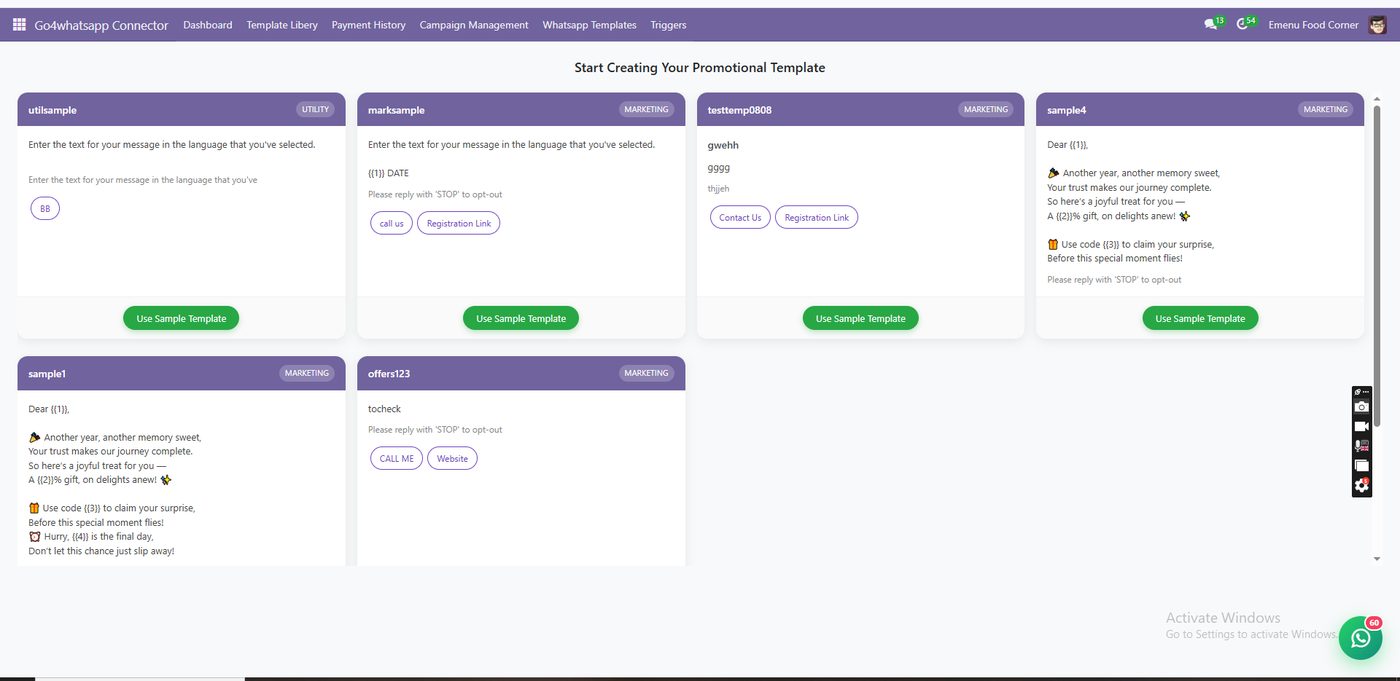
Start from a library
Ready-made marketing and utility samples you can put to use in one click, then adjust to your wording.
See approval at a glance
Each template shows its type, category and Meta status: approved or rejected. No checking Meta Business Manager.
All formats in one list
Normal, interactive and auto-response templates for marketing, utility and service messages, with media and buttons.
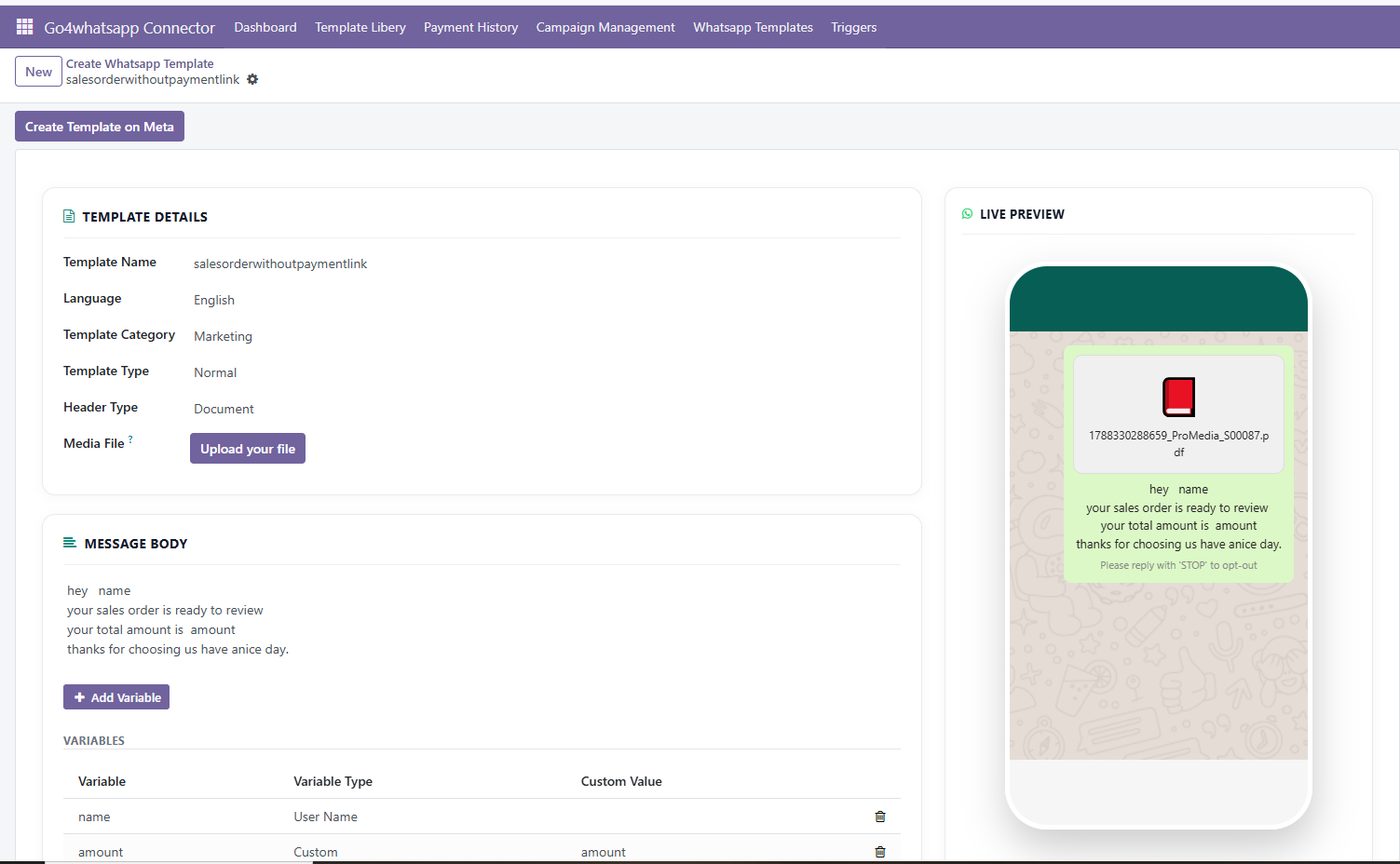
Variables from Odoo fields
Customer name, order number and amount map to Odoo fields, so one template personalises itself for every record.
How it works in Odoo
From draft to an approved message your triggers can use
Build the template with a live preview
Write the header, body, buttons and variables and watch the phone preview update as you type. What you see is what the customer receives.
Submit to Meta and track the status
Templates are submitted for Meta approval from Odoo and the list shows which are approved and which were rejected, so you fix wording before a campaign or trigger depends on it.
Test on a real phone, then use it everywhere
Send a test to any number, by country, in one step. Once approved, the same template is used by campaigns, triggers, reminders and the live chat.
Compare
Templates in Meta Business Manager vs inside Odoo
Swipe the table to compare →
| Task | Meta Business Manager, separately | Go4whatsup inside Odoo |
|---|---|---|
| Where you write templates | A separate Meta screen | In Odoo, next to your records |
| Starting point | Blank | Library of marketing and utility samples |
| Knowing approval status | Check Meta | Status shown on every template in Odoo |
| Preview | Basic | Live phone preview with variables and buttons |
| Testing | Manual | Test send to any number by country |
| Personalisation | Variables typed by hand | Variables mapped to Odoo fields |
Getting started
Your first approved WhatsApp template in Odoo
Pick a sample
Choose a marketing or utility sample from the library, or start a new template.
Map the variables
Link each variable to an Odoo field such as customer name, order number or total.
Preview and test
Check the live preview, then send a test to your own phone.
Submit and use
Submit to Meta; once approved, use it in triggers, reminders, campaigns and chat.
Pricing
One Odoo price, everything included.
Odoo + WhatsApp Complete is $79 per month, and $49 per month for the first 3 months. It includes templates, campaigns, triggers and reminders, live chat, CRM leads, catalogue sync, chatbots and the message log, for unlimited agents. Meta's per-message charges are billed at cost, with no markup.
- $49/mo for the first 3 months
- Odoo Community and Enterprise, 15–20
- Unlimited agents
- Done-for-you onboarding
- Meta per-message fees at cost
WhatsApp templates in Odoo: common questions
Can I create WhatsApp templates inside Odoo?
Yes. Go4whatsup lets you create, sync, preview and test Meta-approved WhatsApp templates inside Odoo, starting from a library of ready-made marketing and utility samples or from scratch.
How do I know if Meta approved my template?
Every template in the Odoo list shows its type, category and Meta status, approved or rejected, so you can see at a glance which ones are ready to use.
Can template variables use Odoo data?
Yes. Variables map to Odoo fields such as the customer name, order number and total, so one template speaks to every customer by name when it is sent from a trigger, reminder or campaign.
Which template types are supported?
Normal, interactive and auto-response templates for marketing, utility and service use, with headers, media, variables and buttons.
Can I test a template before customers see it?
Yes. Each template has a live preview of the header, body, buttons and variables, and you can send a test to any number, by country, in one step.
Why do I need templates at all?
On the WhatsApp Business API, a business can message a customer freely only within 24 hours of the customer’s last message. Outside that window, and for broadcasts and automated notifications, Meta requires an approved template.
Does this work on Odoo Community?
Yes, on Odoo Community and Enterprise, versions 15 to 20.
What does it cost?
Template management is included in Odoo + WhatsApp Complete: $79 per month, $49 per month for the first 3 months, unlimited agents.
More for Odoo: Odoo WhatsApp integration · Live chat in Odoo · Odoo CRM and sales on WhatsApp · Odoo WhatsApp automation · Invoices and order updates · Bulk WhatsApp marketing · WhatsApp catalogue and commerce · AI chatbot for Odoo · Pricing
Book a demo on your real WhatsApp number
Free onboarding on every paid plan. Typically live in 24 hours once your Meta Business Manager is verified.