Go4whatsup for Odoo · CRM and sales
Odoo CRM WhatsApp integration — inbound chats become CRM leads, and any sales order goes out on WhatsApp from the record.
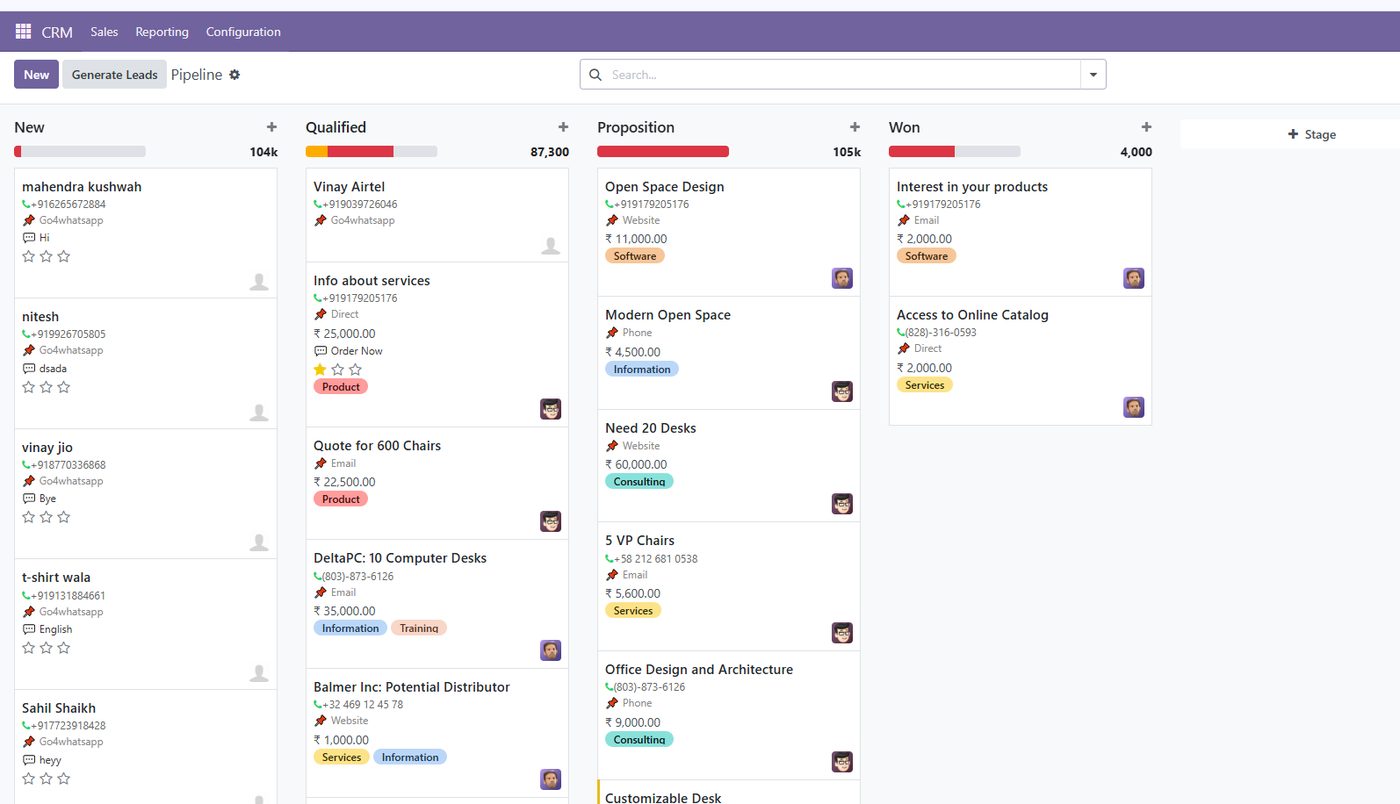
Leads that start on WhatsApp usually never reach Odoo CRM, and quotations go out by email or from a salesperson’s phone. Go4whatsup connects the two: every new WhatsApp conversation lands in your CRM pipeline as a lead, and any quotation or sales order can be sent on WhatsApp from the Odoo record with the PDF attached and the message logged in chatter. The deal, the documents and the conversation sit on one record.
Odoo + WhatsApp Complete · $79/month, $49/month for the first 3 months · Unlimited agents · Works on Odoo Community and Enterprise.
The short answer
What the Odoo CRM WhatsApp integration does
Every WhatsApp chat becomes a lead
A new inbound message creates a CRM lead automatically, so no enquiry stays on a phone or in someone’s memory.
Send on WhatsApp from any order
A Send on WhatsApp button on quotations and sales orders sends the approved message with the PDF attached.
One record for the whole deal
The message is logged in the Odoo chatter, next to the order, the customer and the documents.
The right price list for each customer
Retail, wholesale and regional pricelists from Odoo can be shared on WhatsApp, so no customer gets the wrong rate.
How it works in Odoo
How WhatsApp fits into your Odoo sales flow
A WhatsApp enquiry lands in the CRM pipeline
The customer writes to your business number. Odoo opens a live chat and creates a lead in CRM, ready to qualify and move through your stages like any other lead.
Send the quotation or order on WhatsApp
From the quotation or sales order, the salesperson clicks Send on WhatsApp. The approved template goes out with the customer’s name, the order number and the total filled in, and the PDF attached.

Follow-ups run on their own
Order and payment events can trigger the next message automatically, and scheduled reminders chase quotations and due dates within working hours. See Odoo WhatsApp automation.

Compare
Email and personal phones vs WhatsApp inside Odoo CRM
Swipe the table to compare →
| Sales step | Email and personal phones | Go4whatsup in Odoo CRM |
|---|---|---|
| A new WhatsApp enquiry | Stays on a phone; often never logged | Created as a CRM lead automatically |
| Sending a quotation | Email attachment, or a forwarded PDF | Send on WhatsApp from the quotation, PDF attached |
| Order details in the message | Retyped by hand | Name, order number and total filled from Odoo |
| Where the conversation is kept | Inbox or phone, apart from the deal | In the Odoo chatter on the order |
| Customer-specific prices | Sent manually, easy to mix up | Each customer’s Odoo pricelist shared in one click |
| Seat cost | n/a | Unlimited agents, $79/month |
Getting started
Connect Odoo CRM to WhatsApp in four steps
Install the module
From the Odoo Apps Store, on Community or Enterprise 15 to 20.
Connect your number
Verify Meta Business and connect your WhatsApp number to the official API, with our team.
Approve your sales templates
Quotation, order confirmation and follow-up templates, mapped to Odoo fields.
Turn on lead creation
New chats become leads; salespeople start sending orders on WhatsApp.
Pricing
One Odoo price, everything included.
Odoo + WhatsApp Complete is $79 per month, and $49 per month for the first 3 months. It includes templates, campaigns, triggers and reminders, live chat, CRM leads, catalogue sync, chatbots and the message log, for unlimited agents. Meta's per-message charges are billed at cost, with no markup.
- $49/mo for the first 3 months
- Odoo Community and Enterprise, 15–20
- Unlimited agents
- Done-for-you onboarding
- Meta per-message fees at cost
Odoo CRM and WhatsApp: common questions
Can WhatsApp chats create leads in Odoo CRM automatically?
Yes. With Go4whatsup every new inbound WhatsApp conversation opens a live chat in Odoo and creates a CRM lead, so WhatsApp enquiries enter the same pipeline as every other lead.
Can I send an Odoo quotation or sales order on WhatsApp?
Yes. Quotations and sales orders get a Send on WhatsApp action. It sends a Meta-approved template with the customer name, order number and total filled in from Odoo and the PDF attached, and the message is logged in the order’s chatter.
Is the WhatsApp conversation saved in Odoo?
Yes. Messages are logged in the Odoo chatter of the record and in the Go4whatsup message log, with the sender and the delivery outcome.
Can each customer get their own price list on WhatsApp?
Yes. Customers are tied to their Odoo pricelist, and price rules by product and quantity can be shared on WhatsApp in one click, so retail, wholesale and regional prices stay separate.
Does this work with Odoo Community CRM?
Yes. Go4whatsup works on Odoo Community and Enterprise, versions 15 to 20.
Can quotation follow-ups be automated?
Yes. Triggers send a template when an order reaches a chosen state, and date-based reminders follow up a set number of days before or after any date on the document, within working hours.
How much does the Odoo CRM WhatsApp integration cost?
It is part of Odoo + WhatsApp Complete: $79 per month, $49 per month for the first 3 months, with unlimited agents. Meta’s per-message charges are billed at cost.
Where do I get the module?
On the Odoo Apps Store as the Go4whatsup WhatsApp Odoo Connector. Our team also helps with installation and Meta setup.
More for Odoo: Odoo WhatsApp integration · Live chat in Odoo · WhatsApp templates in Odoo · Odoo WhatsApp automation · Invoices and order updates · Bulk WhatsApp marketing · WhatsApp catalogue and commerce · AI chatbot for Odoo · Pricing
Book a demo on your real WhatsApp number
Free onboarding on every paid plan. Typically live in 24 hours once your Meta Business Manager is verified.