Odoo WhatsApp automation — supercharge orders, invoices, reminders.
The only complete messaging engine for Odoo users. Send order updates, invoices, payment reminders, stock alerts, and delivery notifications — directly from Odoo to WhatsApp. Zero manual work. 100% automation.
🇺🇸 US buyer? See the US Odoo + WhatsApp playbook — TCPA 2026, Hispanic audience reach, cross-border LatAm shipping.
No credit card needed · Free onboarding support

From WhatsApp order → Odoo SO → Invoice — no manual typing.
Trusted by 1,500+ businesses across India and the UAE
Click in Odoo. Lands in WhatsApp.
No copy-paste. No middleware. The same record in Odoo automatically sends the right WhatsApp message — branded, attached, in the customer's language.
All this from 9 Odoo modules · 100+ languages · 2-minute install
Book a 15-min Odoo demo →Your ERP runs everything — but your communication still runs manually.
Communication delays = lost revenue + unhappy customers. Here's what breaks when Odoo doesn't talk to WhatsApp.
Go4whatsup × Odoo — five ways your ERP finally ships messages.
Automate every customer update
Keep customers informed at every step — synced live from Odoo workflows to WhatsApp.
- Invoice PDFs sent as WhatsApp attachments
- Order confirmations fire the instant the SO is validated
- Payment received → auto acknowledgement
- Delivery dispatched → real-time tracking message
Manage conversations inside Odoo
Customer replies show up in Odoo's communication panel — your team replies without ever leaving Odoo.
- See full chat history on the Odoo customer record
- Two-way messaging — reply directly from Odoo
- Message logs tied to the right SO/Invoice/Ticket
- Attachments flow back into the Odoo record
Smart campaigns & promotions
Promotions that use real Odoo segments — customers who bought X, left Y in cart, haven't returned in 90 days.
- Automated abandoned-cart recovery
- Upsell & cross-sell broadcasts
- Segmented offers to existing customer lists
- WhatsApp Catalog + product availability flows
Internal team alerts
Not every message is for customers. Operations runs on WhatsApp too.
- Low-stock alerts to inventory managers
- Purchase order approvals for finance
- Manufacturing QC alerts to production
- Vendor updates to purchasing
Full template control
Pre-approved Meta templates plus multi-language support for GCC + India customers.
- Pre-approved WhatsApp template library
- Fire any template from any Odoo event
- Multi-language (English, Arabic, Hindi, more)
- Dynamic variables pulled live from Odoo records
Two-way sync that actually works
Bidirectional, field-level. Nothing drops between Odoo and WhatsApp.
- Odoo → WhatsApp: SO, Invoice, Shipment, Payment
- WhatsApp → Odoo: new lead, reply, attachment, support ticket
- Secure token-based authentication
- Works with Odoo Studio custom fields
Watch Go4whatsup × Odoo in action
Real Odoo record, real WhatsApp message — and the customer reply landing back on the same record. No slides.
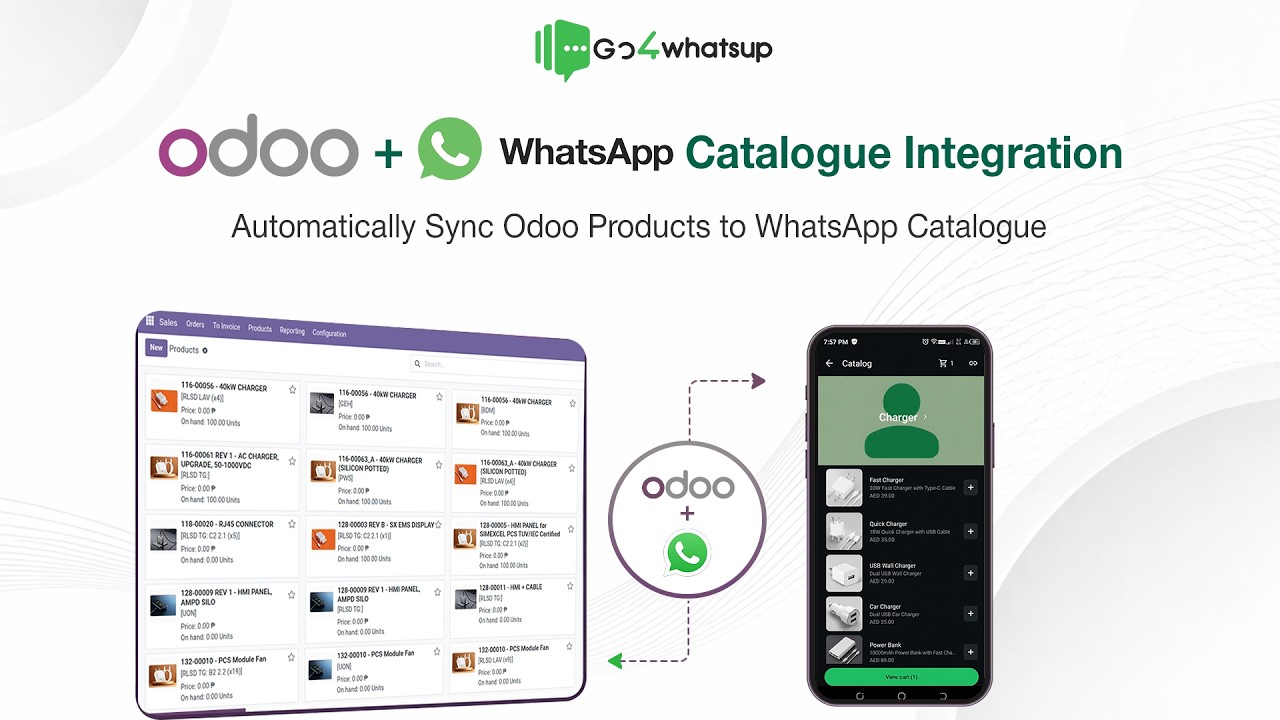
Nine modules. One WhatsApp engine. Zero extra apps.
Whatever your team already uses in Odoo, Go4whatsup is ready to fire messages from it.
See exactly what Odoo × WhatsApp looks like before you start.
We've built workflows for eight industries running Odoo. Pick yours — these flows ship on day one.
Retail & supermarkets
- POS bill sent instantly on WhatsApp as PDF
- Stock-availability alerts for fast-moving items
- Invoice & payment reminders
- Promo broadcasts to existing customers
- Loyalty & repeat-purchase nudges
Manufacturing & production
- Work order notifications
- QC approval alerts
- Production status updates
- Dispatch & delivery confirmation
- Vendor & purchase order updates
E-commerce & online stores
- Abandoned-cart recovery messages
- Order confirmation on WhatsApp
- Invoice & payment receipts
- Shipping & delivery updates
- COD confirmation messages
Wholesale & distribution
- Bulk order confirmation
- Invoice & outstanding payment alerts
- Stock-refill notifications
- Delivery coordination messages
- Distributor communication
Food & beverage · restaurants
- POS receipts via WhatsApp
- Order status updates
- Customer follow-ups
- Loyalty & repeat offers
- Feedback requests
Healthcare & clinics
- Appointment reminders
- Billing & invoice notifications
- Follow-up care messages
- Test-report notifications
- Payment alerts
Real estate & property
- Lead acknowledgement messages
- Site-visit reminders
- Quotation & agreement sharing
- Payment & milestone updates
- Post-handover communication
Logistics & transportation
- Dispatch alerts
- Shipment tracking updates
- Delivery confirmation (POD)
- Invoice & billing messages
- Delay notifications
Simple, fast, fully guided — live in under an hour.
No coding. Module install takes 2–3 minutes. Our team walks you through the whole thing on the demo call.
Install the Go4whatsup module
One-click install from your Odoo Apps. Works on Odoo 12, 13, 14, 15, 16, and 17 — Community and Enterprise.
Paste your API key
We hand you the key from your Go4whatsup dashboard. Paste it into Odoo settings. Takes 30 seconds.
Pick the events to automate
Sales, Invoicing, Inventory, CRM, POS, MRP — toggle the events you want. Map each to a pre-approved WhatsApp template.
Go live
Fire a test order in Odoo. Customer gets a WhatsApp confirmation. Reply comes straight back to the Odoo record.
A full Odoo × WhatsApp automation engine — not just a webhook.
Real reviews from teams running Go4whatsup today.
Excerpts from verified Google reviews — all five-star.
Intuitive platform — bulk messaging, contact management, and chatbot flows set up in minutes. Analytics and CRM integration are excellent.
Persistent support team. They got our daily sending limit increased to 1 lakh/day when nobody else could.
Smooth WhatsApp Business API setup. Himanshu and the team gave outstanding support through verification and onboarding.
Non-tech-savvy user here — the in-person tech support got me onboarded to Meta and built our first chatbot with ease.
Quick and easy platform, brilliant onboarding team. Himanshu and Sahil made the whole process painless.
Professional, responsive team — the chatbot works efficiently and handles our volume with no drops.
Questions your IT team and finance team will ask.
Do I need Odoo Enterprise to use this integration?
No. Go4whatsup works with both Odoo Community and Enterprise — across all major modules including Sales, Invoicing, Inventory, CRM, POS, and MRP.
Which versions of Odoo does Go4whatsup support?
Odoo 12, 13, 14, 15, 16, and 17 — both Community and Enterprise editions. We ship regular updates aligned with new Odoo releases.
Will customer replies show directly inside Odoo?
Yes. Incoming WhatsApp messages appear instantly in Odoo's communication panel (and in the Go4whatsup inbox). Your team can read, reply, tag, and manage conversations without switching tools.
Can I send invoice PDFs, quotations, and delivery slips on WhatsApp?
Yes. Invoice PDFs, quotations, purchase orders, delivery slips, payment receipts, and any Odoo-generated document can be sent directly via WhatsApp as media messages.
Can I automate specific Odoo events — like order confirmation or stock alerts?
Yes. Triggers from Sales, CRM, Invoicing, Inventory, MRP, POS, Purchase, Accounting, or your own custom modules can each be linked to a WhatsApp template and fired automatically.
Does this integration require technical knowledge or coding?
No coding required. Module installation takes 2–3 minutes and setup is fully guided. Free assisted onboarding is included on every paid plan.
Do WhatsApp message templates need Meta approval?
Yes, for messages sent outside the 24-hour customer window. We give you a pre-approved template library to start with; new template submissions typically clear Meta approval in 5–15 minutes.
How many users can access Go4whatsup on each plan?
Users scale by plan: 5 on Standard, 10 on Premium, 15 on PRO, and custom on Enterprise. Add-on user seats are available on every paid tier. Sales, Support, Dispatch, Finance, and Operations can work concurrently with permission controls.
How does pricing work?
Start on the Free Plan Forever (AED 0). Paid tiers begin at AED 149/month (Standard) and scale by user count, contact volume, and chatbot automation. Yearly plans get 10% off. WhatsApp conversation charges are billed on actuals at Meta's published rates — no markup from us. See full pricing →
Is the integration secure?
Yes. Go4whatsup uses the official WhatsApp Business API with secure token-based authentication. Messages flow directly between Odoo → Go4whatsup → WhatsApp with strict security standards. GDPR & DPDP Act compliant.
What if my Odoo or WhatsApp API setup is heavily customized?
The module works with most customizations out of the box, including Odoo Studio custom fields. For heavy customizations, our technical team reviews the setup and ensures compatibility — including custom automation flows and tailored data pipelines.
Can I use my existing WhatsApp number?
Yes. You can migrate an existing WhatsApp number to Go4whatsup, or use any valid phone number that can receive an OTP by SMS or voice call — including virtual numbers.
Ready to connect Odoo to WhatsApp?
Native connector. Order updates, invoices, payment reminders fire from Odoo events automatically. Setup in a working day. First 1,000 conversations on us.
Start Free → Book a 20-min DemoYour Odoo is already running your business. Let WhatsApp do the talking.
Book a demo with your Odoo login. We install the module, map your first 3 events to WhatsApp templates, and fire a live test order — all inside the call.
💬 Or WhatsApp us your Odoo version — we'll send back a 2-minute demo video for your setup.