WhatsApp chatbot for GCC businesses — build one without code
A WhatsApp chatbot answers the questions your team retypes fifty times a day — price, stock, booking status, opening hours — and hands the conversation to a human the moment it stops being routine. Here is how GCC businesses build one, what it handles in Arabic, and what it actually changed for customers in Dubai and Oman.
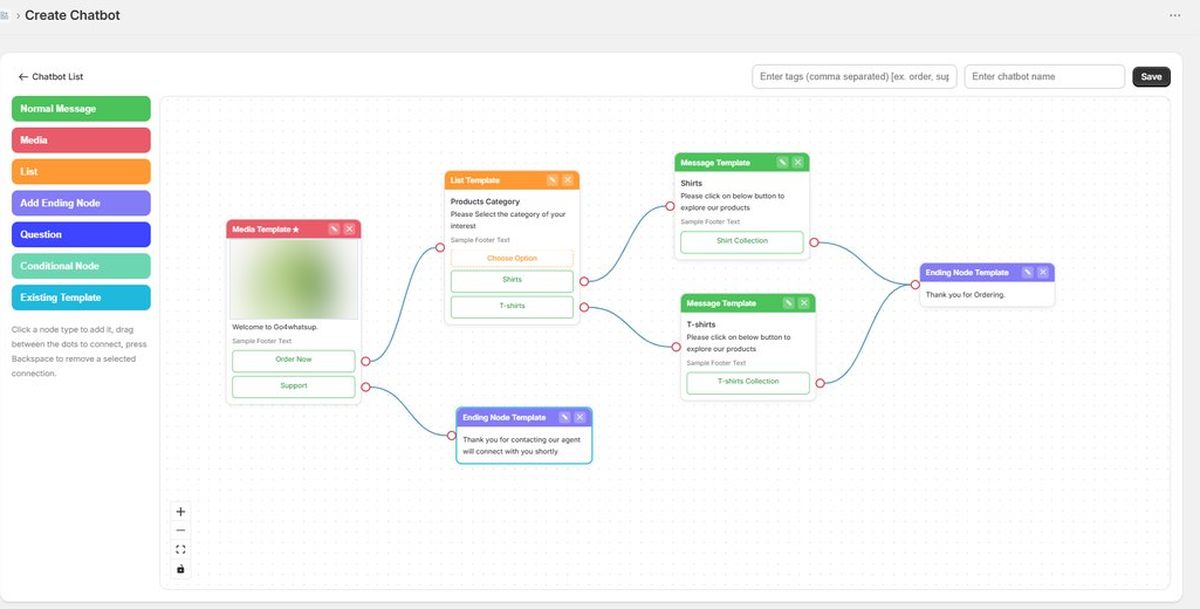
A WhatsApp chatbot on the official WhatsApp Business API runs automated conversations on your business number. On Go4whatsup you build it on a visual canvas — Normal Message, Media, List, Question and Conditional nodes, connected by dragging between dots — with no code. Arabic works natively, and two-way auto-translate across 100+ languages lets English-speaking agents serve Arabic customers without a translator. Typical go-live is 24 hours once Meta Business Manager is verified, 24–48 hours for a brand new business.
- Built visually — no code needed; REST API and webhooks available for developers
- Arabic native in messages and Meta-approved templates, RTL rendering automatic
- Nova AI replies and auto-translate both cover 100+ languages
- Unlimited agents and unlimited conversations on a flat tier — not per seat
- PDPL-compliant across UAE, Saudi, Bahrain, Oman, Qatar and Jordan; DPA on request
- Live in 24 hours typical · 24–48 hours end to end for a new business
What a WhatsApp chatbot actually does
Most GCC teams do not need a chatbot that holds a philosophical conversation. They need one that stops their agents from answering the same six questions all day.
A chatbot on the WhatsApp Business API sits on your business number and runs a flow you designed. A customer messages you at 11pm. The bot greets them, shows a list of options, takes the answer, and either resolves it — order status, branch timings, the price list, a booking slot — or collects enough detail that the agent who picks it up in the morning already knows what the conversation is about.
The part that matters commercially is the handover. A chatbot that traps people in a menu loses them. A chatbot that answers what it can and routes the rest to a person keeps the sale alive.
Building one — the five node types
The builder shown above is the whole tool. You add a node, then drag from the dot on one node to the dot on another to connect them. That connection is the conversation path.
| Node | What it does | Typical use |
|---|---|---|
| Normal Message | Sends plain text | Greeting, confirmation, closing line |
| Media | Sends an image, PDF or video with buttons | Catalogue page, price list, location map |
| List | Shows a selectable menu | Choose category, choose branch, choose service |
| Question | Captures a typed answer | Name, order number, trade licence number |
| Conditional Node | Branches on the answer | Route VIP vs standard, Arabic vs English, Dubai vs Abu Dhabi |
An Ending Node closes the flow or hands to a live agent. Existing Template pulls in a Meta-approved template you have already cleared, which matters because business-initiated messages outside the 24-hour window must use an approved template.
The Arabic problem, and what solves it
This is the part that separates a GCC deployment from a generic one.
Arabic is fully supported in WhatsApp messages and in Meta-approved templates, and right-to-left rendering is automatic — that is true on any platform built on the official API. The real constraint is not the bot. It is the human behind it.
A Dubai business typically serves customers in Arabic, English, Hindi, Urdu and Tagalog, and cannot staff fluent agents in all of them around the clock. So the conversation stalls the moment it leaves the scripted flow.
Go4whatsup handles that with two-way auto-translate across 100+ languages. The customer writes in Arabic. The agent reads it in English, replies in English, and the customer receives Arabic. Separately, Nova AI can answer from your FAQ in 100+ languages before a human is involved at all.
What it changed for three GCC businesses
These are Go4whatsup customers in the region. The numbers are from their case studies, not projections.
Al Rawan Travel · Dubai
72%
of bookings now happen on WhatsApp. Agents had been hand-translating between Arabic, English and Hindi — every quote took 20 minutes to draft. Quotes now go out in under 3 minutes, and the close rate tripled.
Nour Retail · Dubai
18 min → 3.2 min
Median first-response time. Six agents on a shared inbox could not hold it under 20 minutes. An upsell flow fires three days after purchase with an offer based on what the customer bought — upsell up 26%.
FastCo · Oman
−36%
"Where's my shipment?" tickets. When a route delay hits, 500 affected customers need notifying within 30 minutes — that is a broadcast plus a status bot, not six agents typing.
Chatbot or AI agent — you want both
These get confused constantly, and the distinction decides what you build.
| Flow chatbot | AI agent (Nova) | |
|---|---|---|
| How it answers | Follows the path you drew | Generates an answer from your FAQ and product info |
| Predictable? | Completely — it can only say what you wrote | Mostly — it composes the wording itself |
| Best at | Menus, order status, booking steps, qualification | Questions you never anticipated |
| Fails when | The customer asks something off-menu | The source material does not cover it |
Run the flow for the structured path — that is most of your volume and you want it exact. Let the AI catch what falls outside. Anything neither can close goes to a human with the transcript attached.
Getting one live
- Get on the official API. A chatbot needs the WhatsApp Business API, not the WhatsApp Business app. If you are not on it yet, start with the GCC WhatsApp Business API guide.
- Write down the six questions you answer most. Pull them from your actual inbox, not from a brainstorm. That list is your first flow.
- Build the flow. Greeting, then a List of those six, then a Message or Media node per branch, then an Ending Node that offers a human.
- Get templates approved. Anything you send outside the 24-hour customer-initiated window needs a Meta-approved template. Submit early — review is not instant.
- Test in Arabic and English. Send yourself the whole flow in both. RTL layout changes where buttons sit, and long Arabic strings wrap differently.
- Watch the handover rate for a week. If most conversations escape the flow, your menu is wrong — not your chatbot.
On "free WhatsApp chatbot". Go4whatsup has a free plan — no credit card, limited monthly conversations — which is genuinely enough to build and test a full flow. But Meta charges its own per-conversation fee on the official API no matter which platform you use, so no WhatsApp chatbot is truly free at production volume. Anyone claiming otherwise is either not on the official API or is absorbing the fee into a higher subscription. See GCC pricing for the real arithmetic.
Compliance in the region
The WhatsApp Business API complies with the region's data protection regimes — UAE PDPL, Saudi PDPL, Bahrain PDPL, Oman PDPL under Royal Decree 6/2022, Qatar DPL, and Jordan PDPL. Go4whatsup provides a signed Data Processing Agreement on request for GCC enterprise customers.
Two practical points teams miss. Opt-in must be collected and logged before you send a business-initiated message — a chatbot does not exempt you. And if your flow captures anything sensitive, decide deliberately what gets stored versus what stays in the conversation.
Quick answers
Where to go next
Build your chatbot on a call, not in a support queue
Bring the six questions your team answers most. We will build the flow with you and have it live on your number — Arabic and English — inside 24 hours.
Book a demo Start free