"Is the WhatsApp Business API worth paying for?" is the question we get on almost every demo call. It's a fair question — the free WhatsApp Business app is right there, downloadable, no invoice. So why would anyone pay?
The short answer is: you don't pay for the privilege of using WhatsApp. You pay because at a certain scale, the free app stops being free — it starts costing you in lost replies, missed broadcasts, and agents who can't see each other's conversations. The fee version isn't an upgrade. It's a different product.
Below: who should stay on free, who needs the API, what the API actually costs in 2026 (with the two-bill split most people don't know about), and how to know when you've crossed the line.
Free WhatsApp Business app vs paid API — side by side
Both run on the same WhatsApp infrastructure. They're not the same product. Here's the honest comparison for a 2026 operator.
WhatsApp Business app
- One phone number, one device (one or two devices via Linked Devices)
- Manual replies — one person tapping the screen at a time
- Broadcast lists capped at 256 contacts per send
- Quick replies, labels, away message, basic catalog
- No real automation, no CRM sync, no agent handover, no dashboard
WhatsApp Business API (via a platform)
- One number, unlimited agents handling chats together
- Broadcast to your full opt-in list, segmented and scheduled
- Chatbots, drip flows, abandoned-cart recovery, AI auto-reply
- CRM, Shopify, Odoo, Zoho, Google Sheets sync — order data in chat
- Reports, response-time SLAs, agent performance, audit trail
That last line — two bills — is where most "WhatsApp is expensive" horror stories come from. Let's untangle it.
What you're actually paying for — the two-bill model
Every WhatsApp Business API operator in 2026 pays two separate invoices. One goes to Meta, one goes to your platform. Understanding this split is the single biggest cost lesson on this page.
Bill 1 — Meta's per-conversation charge
Meta charges per 24-hour conversation, in four categories: Marketing, Utility, Authentication, and Service. The first 1,000 customer-initiated Service conversations every month are free, globally — that alone covers most small support teams. Marketing conversations are the most expensive; Utility (order updates, OTPs) is cheaper. For the full rate-card detail, see our deep-dive on Meta WhatsApp Pricing.
Bill 2 — the platform subscription
The software you use to actually send those messages: inbox, agents, chatbots, automations, broadcasts, integrations, reports. This is where vendor pricing varies wildly — from $0 on entry tiers (Go4whatsup included) to $499+ / month on enterprise-positioned vendors. Same WhatsApp number underneath; very different software around it.
The trap: some vendors quote you a small "platform fee" then mark up Meta's per-conversation charges 30–60%. Always ask: "Is Meta passed through at-cost, or marked up?" If they can't answer in one sentence, assume marked up.
6 signs the free app is already costing you more than the API would
If two or more of these are already true, the math has flipped. The free app isn't free anymore — it's just hiding the bill.
You have 3+ people who need to reply
Free caps you at one or two devices. Three teammates fighting over one phone is how leads go cold.
Your broadcast list crossed 256 contacts
Splitting it into batches manually, every campaign, is a half-day job. With API broadcasts it's one click.
You want a chatbot for FAQs
The free app has zero automation. Even basic "what are your hours" needs a human reply.
Your CRM and your WhatsApp don't talk
Customer messages on WhatsApp; lead record in Zoho/Salesforce; agent has two windows open. That's a sync cost paid in switching time.
You can't see who said what
Free has no audit trail. When a customer complains "your team promised X", you can't verify it.
Your replies are getting slower
Average reply time over 30 minutes during business hours = lost sales. The free app has no SLA tooling to prevent it.
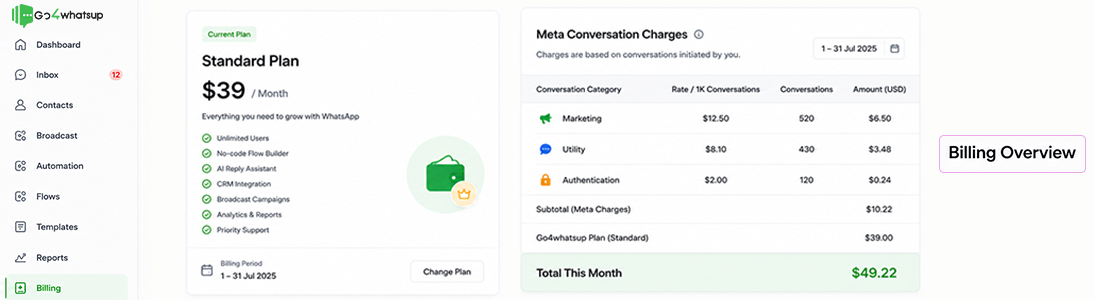
A real all-in cost example — 10-agent operation (India Meta rates, shown in USD)
Here's what a typical SMB on Go4whatsup pays end of month. Numbers below are illustrative — your exact bill depends on conversation mix, but the shape is consistent. Numbers below are in USD. Meta charges conversation fees per country; this example uses India's 2026 rates converted to USD so you can compare against your own market. For your country's exact numbers, use the cost calculator.
10 agents · ~3,000 conversations / month · in USD
Replace 10 agents with 50, and the platform fee scales by tier (not by seat tax) on Go4whatsup. Meta charges scale with volume only.
For a Europe equivalent — same shape, ~€100–€350 / month all-in for a 10-agent operation. UAE and Saudi Arabia tend to land in the middle. The full TCO breakdown for 3, 10, and 50 agents (with payback math) lives in our deeper guide on WhatsApp Business API pricing 2026.
When does paying for the API pay back?
For most teams running WhatsApp as a real sales or support channel, payback lands in 4 to 8 weeks. The drivers are usually some mix of these:
- Reply speed. A chatbot answering "are you open Saturday?" instantly recovers the 30% of leads that wouldn't have waited an hour.
- Broadcast reach. Sending a campaign to 4,000 opt-ins instead of 256 changes campaign ROI by an order of magnitude.
- Abandoned-cart recovery. A two-message WhatsApp follow-up on dropped carts typically recovers 12–18% of lost orders. The free app can't do this at all.
- Agent capacity. Drafted replies and shared inbox mean three agents do the work of five. That's the real OPEX cut.
The teams where API doesn't pay back are the ones whose entire business is 5 conversations a week. If that's you, stay on the free app — you don't have a WhatsApp problem yet.
3 ways to cut your WhatsApp bill once you're paying
1. Use the free Service window
Meta gives you 1,000 free customer-initiated Service conversations every month, globally. If you can route customer questions through WhatsApp first (not phone or email), a huge chunk of your support stays inside that free ceiling.
2. Convert "Marketing" templates to "Utility"
An order confirmation is Utility (cheap). A "we miss you, come back" message is Marketing (expensive). When designing templates, ask yourself: is this triggered by a real event in the customer's order, or is it a campaign? Real events should be Utility templates.
3. Pick a vendor that passes Meta charges through at cost
Mark-up on Meta charges is the single biggest hidden line. On Go4whatsup, Meta charges show up on every monthly invoice as a separate line at exactly Meta's rate — no margin added. If your current vendor can't show you that line, ask why.
How Go4whatsup prices it
Three things shape our pricing differently from most platforms in this space:
- Per-tier, not per-agent. You can grow from 5 to 50 agents on the same plan without a seat tax kicking in.
- Meta charges at-cost pass-through. Shown as a separate line on every monthly invoice, at Meta's rate, no markup.
- AI + auto-translate + chatbot included on every paid plan. Not upsold as add-ons. Auto-reply, drafted replies, AI campaign copy, and 100+ language translation are part of the platform fee, not separate SKUs.
You can see the live tier breakdown on our pricing page, or get a tailored model for your country and volume on a 30-minute demo call.
Want to see your real monthly WhatsApp cost in 10 minutes?
Share your expected volume and target country. We'll model your exact all-in bill — platform + Meta, by category — so you can compare like-for-like before signing anything.
Book A Demo Try the Cost CalculatorIs WhatsApp Business free? Is WhatsApp API free?
Two of the most common questions we get: "is whatsapp business free?" and "is whatsapp api free?" The answers are different — and important. Is WhatsApp Business free? The WhatsApp Business app on a phone is yes, free — that's the small-business product Meta gives away. The WhatsApp Business API is a different product entirely. Is whatsapp api free? No — the API has two cost layers: a platform fee paid to your provider (e.g. Go4whatsup) for the software layer, plus per-conversation charges paid to Meta. There is one exception that confuses people: Meta gives every business 1,000 free service conversations per month, so a very small operation doing only inbound replies could pay zero to Meta — but you still pay the platform fee. Net answer: "is whatsapp business free" → yes for the app, no for the API; "is whatsapp api free" → no, but you do get the first 1,000 service conversations per month from Meta at no charge.
What about a WhatsApp toll free number?
One question that keeps coming up: can you get a whatsapp toll free number for business use? Short answer — sort of, with caveats. WhatsApp Business API doesn't issue toll-free numbers itself; it works with the phone number you already own. So a "whatsapp toll free number" in practice means: take an existing toll-free number from a telecom provider (1-800 in the US, 0800 in UK, 800-series in India for limited use cases) and onboard it onto the API through a platform like Go4whatsup. The API's onboarding accepts toll-free landlines, mobile numbers, and SIP-routed lines as long as you can receive the verification SMS or voice call once. The cost of running a whatsapp toll free number is the same per-conversation Meta rate as any other API number — there's no toll-free surcharge from Meta because customers don't "call" you over WhatsApp; they message you. The only premium is on the telecom side (your toll-free provider's rental fee).
Bottom line
The WhatsApp Business app is free, and for a one-or-two-person business, that's the right answer. Don't let any vendor (us included) talk you into paying before you need to.
But the moment you cross any one of those six lines — 3+ agents, 256+ broadcasts, automation, CRM sync, audit trail, or slow replies — the free app stops being free. The cost just moves to a place that's harder to see: lost leads, repetitive work, missed campaigns, slower response times.
The API isn't an upgrade. It's a different product, for a different stage of your business. If you've already crossed those lines, you're not deciding whether to pay — you're deciding who to pay, and how much markup to accept.
Want the deeper version with platform-by-platform pricing landscape, TCO at 3/10/50 agents, and payback math? Read WhatsApp Business API Pricing 2026.