
Many businesses want to use the WhatsApp Business API to automate customer communication, send notifications, and manage support conversations. However, most platforms charge high monthly fees just to access the API.
The good news is that some platforms now provide free WhatsApp Business API access, allowing businesses to start using automation without paying expensive setup or subscription charges.
In this guide, we’ll walk you through how to set up a WhatsApp Business API for free using Go4whatsup, including the complete step-by-step process to get started.If you’re a business owner, startup, or marketer looking to use WhatsApp for sales, marketing, or support, this guide will help you set up everything quickly.
What is the WhatsApp Business API?
The WhatsApp Business API is designed for businesses that want to communicate with customers at scale. Unlike the standard WhatsApp Business app, the API allows companies to:
- Send automated messages
- Integrate WhatsApp with CRM systems
- Use chatbots
- Send order updates and notifications
- Manage multiple agents from a single dashboard
Want Official WhatsApp Business API Setup?
Get approved quickly with an official Business Solution Provider. Go4whatsup helps you activate the WhatsApp Business API, set up automation, integrate with your CRM or ERP, and start messaging customers the right way.
Start Free Registration Talk to Our ExpertsThis makes it ideal for businesses handling large volumes of customer conversations.
However, many WhatsApp solution providers charge:
- Setup fees
- Monthly subscription charges
- Additional markup on Meta messaging costs
That’s why many businesses look for a free WhatsApp Business API setup option.
Why Use Go4whatsup for Free WhatsApp Business API?
Go4whatsup is a WhatsApp Business API platform designed to help businesses automate communication and manage customer conversations efficiently.
One of the biggest advantages is that Go4whatsup offers a Free Forever Plan, allowing businesses to start using WhatsApp automation without paying platform fees.
Key benefits include:
- Free forever plan
- No markup on Meta conversation charges
- Easy WhatsApp API onboarding
- User-friendly dashboard
- Automation tools and chatbot features
- Multi-agent support
- Integration capabilities
You can start by visiting the official website: https://www.go4whatsup.com/
Step-by-Step Guide to Set Up a Free WhatsApp Business API
Follow the steps below to create your account and apply for the WhatsApp Business API.
Step 1: Visit the Go4whatsup Website
First, go to the official Go4whatsup website.
Open: https://www.go4whatsup.com/
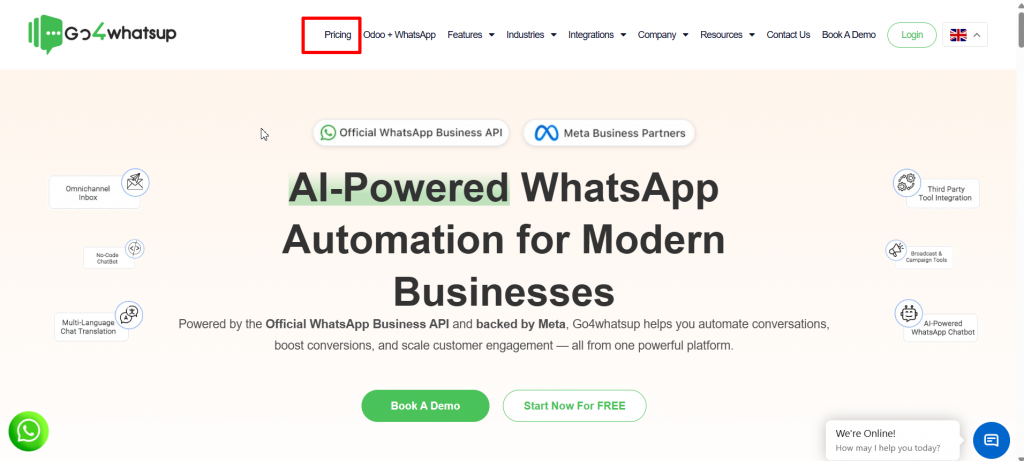
On the homepage, look for the pricing section where you can choose a plan.
You can also directly view the pricing page here: https://app.go4whatsup.com/pricing
Select the Free Forever Plan to get started.
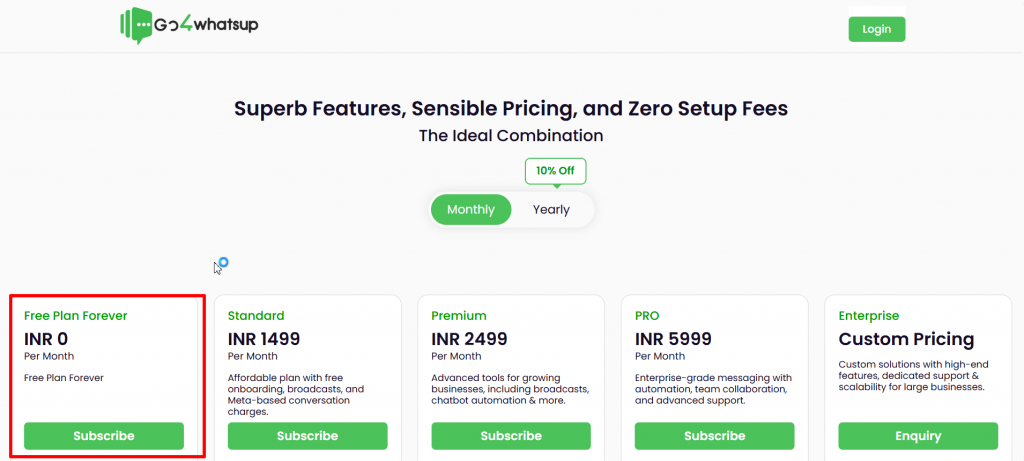
Step 2: Click on Subscribe
Once you open the pricing page, you will see multiple plan options.
To start with the free plan:
- Click on Subscribe
- Then click Continue
This will redirect you to the account registration page where you can create your business account.
Step 3: Create Your WhatsApp Business Profile
Next, you will need to enter your basic business details.
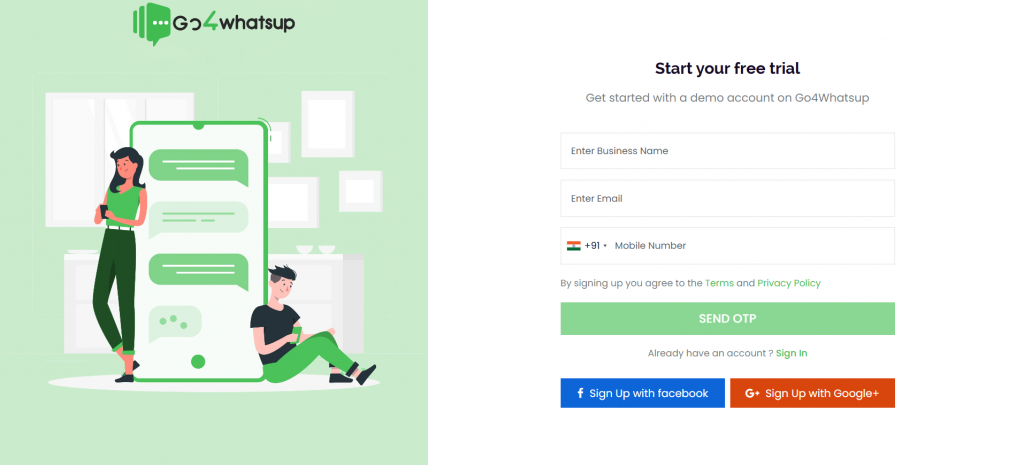
Fill in the following information:
Business Name
Enter the official name of your business.
Email Address
Enter a valid email address that will be used for account access and notifications.
Phone Number
Enter the phone number
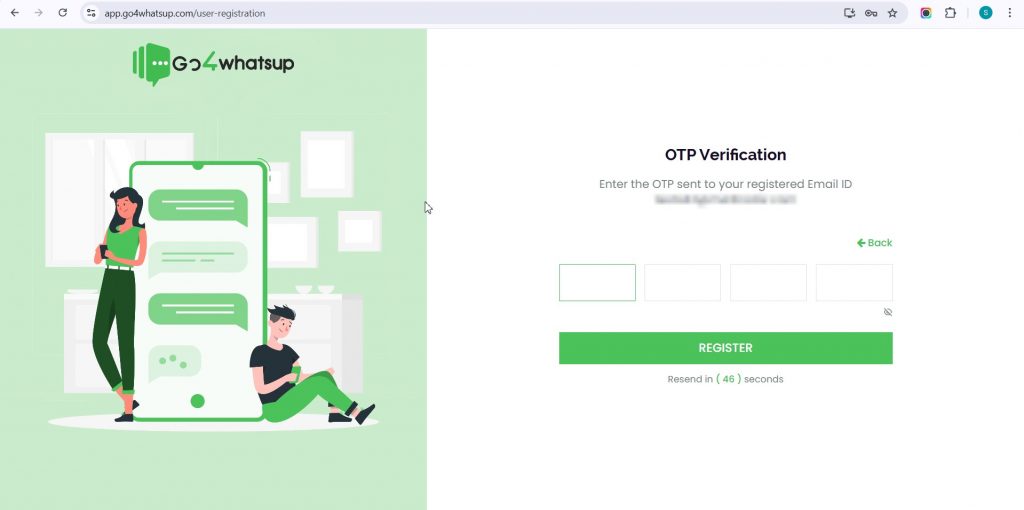
Step 4: Verify Your Phone Number
After entering your phone number, click on:
Send OTP
You will receive a one-time password (OTP) on your phone.
Enter the OTP to verify your number.Once verified, your account setup will be completed.
Step 5: Access the Go4whatsup Dashboard
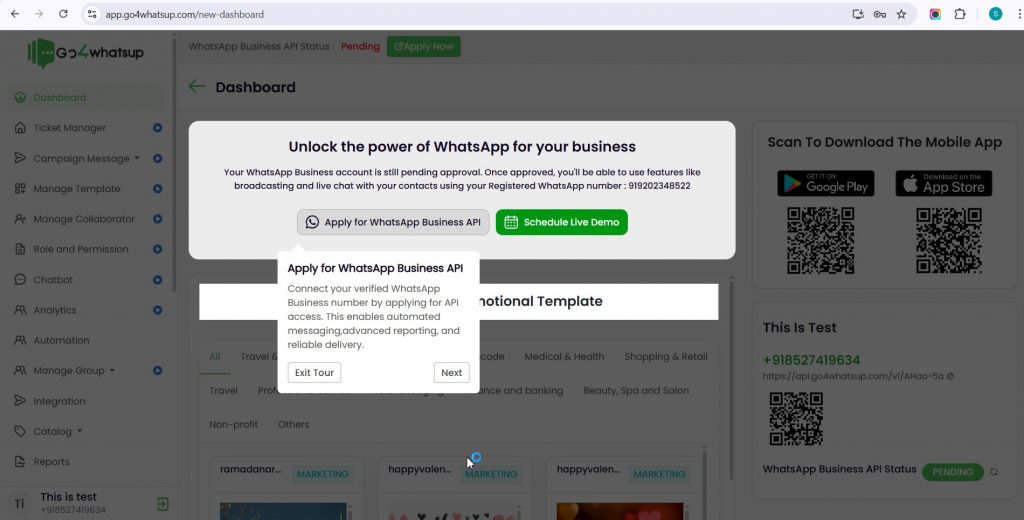
After OTP verification, you will be redirected to your Go4whatsup dashboard.
From here, you can manage:
- WhatsApp conversations
- Contacts
- automation tools
- chatbot flows
- campaign messaging
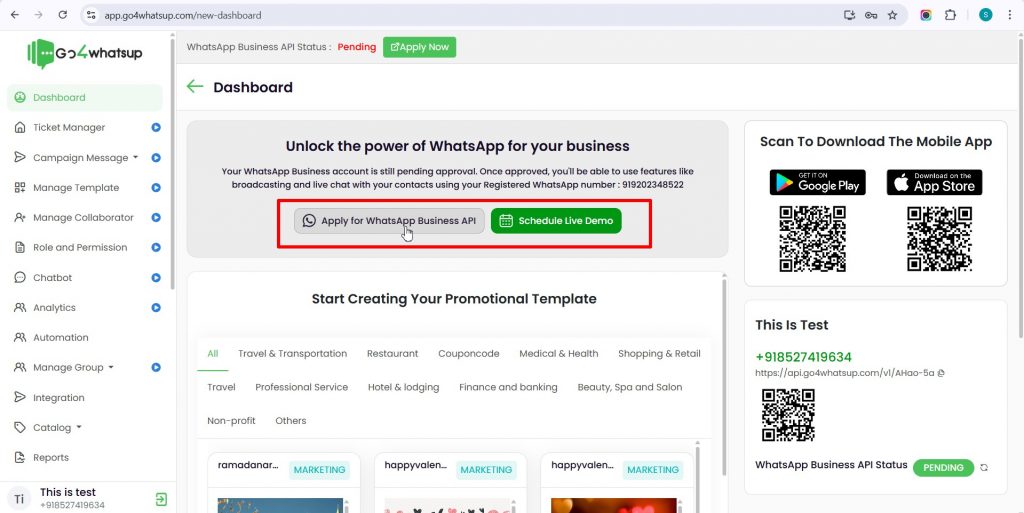
Most importantly, you will see the option to apply for the WhatsApp Business API.
Step 6: Apply for WhatsApp Business API
Inside the dashboard, Go4whatsup provides a guided process to apply for the API.
You will also get:
- Video tutorials explaining the API setup process
- Documentation with step-by-step instructions
To apply for the WhatsApp API, you will need:
- A fresh phone number ( Important tip: Use a fresh phone number that has never been used on WhatsApp before.)
- A Facebook account (for Meta verification)
The API activation process uses Meta’s Embedded Signup, which simplifies the onboarding process.
What is Embedded Signup?
Embedded signup is an official Meta process that allows businesses to apply for WhatsApp Business API directly through a platform like Go4whatsup.
Instead of complex manual approvals, the system guides you through:
- Business verification
- Phone number verification
- WhatsApp Business account creation
- API activation
This process is faster and easier compared to traditional onboarding methods.
Step-by-Step API Setup Guide
Go4whatsup also provides a detailed guide explaining the entire API setup process.
You can follow the complete instructions here:
This guide walks you through:
- Meta account connection
- business verification
- phone number registration
- message template approval
- starting WhatsApp messaging
What You Can Do After Activating the WhatsApp Business API
Once your API is approved and activated, you can start using WhatsApp for business communication.
Some key features include:
Automated Messaging
Send automatic replies, notifications, and alerts.
WhatsApp Chatbots
Create chatbot flows to handle customer inquiries.
Broadcast Messaging
Send updates, offers, and announcements to multiple customers.
Customer Support Dashboard
Manage conversations with multiple agents.
CRM Integration
Connect WhatsApp with your CRM or internal systems.These features allow businesses to turn WhatsApp into a complete communication channel for sales, marketing, and support.
Businesses That Benefit from WhatsApp Business API
Many industries are using WhatsApp automation today.
Examples include:
E-commerce businesses
Send order confirmations, shipping updates, and promotions.
Education institutions
Send admission updates, class reminders, and notifications.
Healthcare clinics
Manage appointments and patient communication.
Real estate companies
Share property details and manage leads.Service businesses
Provide customer support and appointment scheduling.
Why Many Businesses Prefer Free WhatsApp API Platforms
Most WhatsApp Business API providers charge high platform fees, which can be difficult for startups and small businesses.
Free platforms like Go4whatsup help businesses:
- Reduce operational costs
- Start automation quickly
- experiment with WhatsApp marketing
- scale communication as they grow
This makes WhatsApp automation accessible even for small businesses and startups.
Tips Before Applying for WhatsApp Business API
Before starting the API setup process, keep these points in mind.
Use a new phone number that is not currently active on WhatsApp.
Make sure your Facebook account is active, as it will be required for Meta verification.
Prepare your business information, such as company name and email address.Following these steps helps ensure a smooth API approval process.
Final Thoughts
WhatsApp has become one of the most important communication channels for businesses. With billions of users worldwide, it offers unmatched reach and engagement.
Setting up the WhatsApp Business API allows businesses to automate communication, manage customer conversations, and improve response time.
With platforms like Go4whatsup, businesses can now set up the WhatsApp Business API with a Free Forever Plan, making automation accessible without expensive platform fees.
If you’re looking to start using WhatsApp automation for your business, the first step is simple—create your account and begin the API setup process.
Visit: https://www.go4whatsup.com/ and start your free WhatsApp Business API setup today.