
In today’s digital-first business environment, customers expect instant responses, personalized conversations, and seamless engagement across channels. Email open rates are declining, phone calls often go unanswered, and traditional communication tools no longer deliver the speed and context that modern buyers demand.
This is where Zoho CRM integration with Go4WhatsUp transforms the way businesses communicate.
Go4WhatsUp brings official WhatsApp Business API messaging directly into Zoho CRM—allowing sales, marketing, and support teams to manage conversations, run campaigns, track engagement, and maintain complete communication history without ever leaving their CRM workspace.This blog explores everything you need to know about the Zoho + Go4WhatsUp integration, including features, benefits, step-by-step usage, and how it improves business efficiency.
What is Go4WhatsUp?
Go4WhatsUp – WhatsApp Messaging for Zoho CRM is a powerful integration that embeds official WhatsApp Business API communication directly into Zoho CRM.
Instead of switching between WhatsApp, CRM, spreadsheets, and email tools, teams can now:
- Send WhatsApp messages from CRM
- Manage conversations in one unified interface
- Broadcast template messages to multiple leads
- Track engagement and responses
- Automatically log all WhatsApp activity to CRM records
It is built specifically for Zoho CRM users who want a smarter, faster, and more scalable way to communicate with customers.
Why Integrate WhatsApp with Zoho CRM?
WhatsApp has become the most preferred communication channel globally. Customers respond faster on WhatsApp than on email or phone calls. However, managing WhatsApp manually outside the CRM creates operational gaps:
- Conversations are not tracked centrally
- Follow-ups are missed
- Sales context gets lost
- Team collaboration becomes difficult
- Reporting becomes inaccurate
By integrating WhatsApp directly into Zoho CRM through Go4WhatsUp, businesses eliminate these gaps and bring structured communication into their sales and support workflows.
Key Benefits of Zoho + Go4WhatsUp Integration
1. Unified Communication Platform
Sales and support teams no longer need to toggle between WhatsApp and CRM. Everything happens within Zoho CRM itself.
This improves:
- Productivity
- Response speed
- Data accuracy
- Team coordination
2. Complete Conversation Visibility
Every WhatsApp message sent or received is automatically logged against the respective lead or contact record in Zoho CRM.
This ensures:
- Full conversation history
- Better follow-ups
- Improved personalization
- Stronger sales context
3. Faster Lead Conversion
Speed matters in sales.With one-click WhatsApp messaging from Zoho CRM, your team can instantly connect with leads—dramatically reducing response time and increasing conversion rates.
4. Automated Campaign Execution
Broadcast Meta-approved templates to multiple leads at once directly from CRM. Perfect for:
- Campaign promotions
- Event invites
- Fee reminders
- Product updates
- Follow-up sequences
5. Official WhatsApp Business API
Go4WhatsUp operates through the official WhatsApp Business API, ensuring:
- Verified business communication
- Compliance with Meta policies
- High deliverability
- Secure messaging
Core Features of Go4WhatsUp Integration
Let’s explore the major features in detail.
Direct WhatsApp Messaging from Zoho CRM
Send WhatsApp messages to leads or contacts with a single click directly from the Zoho CRM interface.
No need to:
- Copy numbers
- Switch apps
- Save contacts manually
Everything is seamless and integrated.
Integrated Chat Interface
The Go4WhatsUp side panel inside Zoho CRM allows users to:
- View complete WhatsApp conversation history
- Send real-time messages
- Access contextual CRM data
- Manage chats without leaving the lead record
This makes sales conversations structured and organized.
Template & Broadcast Messaging
Use Meta-approved WhatsApp templates to send structured messages for:
- Appointment confirmations
- Payment reminders
- Promotional campaigns
- Re-engagement campaigns
- Follow-up sequences
You can also broadcast messages to multiple leads at once—making large-scale communication effortless.
Template & Catalogue Support
In addition to text templates, businesses can:
- Share product catalogues
- Attach media
- Send documents
- Send structured WhatsApp message formats
This enhances customer engagement and speeds up purchase decisions.
Auto-Logging & Contextual Insights
Every WhatsApp interaction is automatically logged inside Zoho CRM.
You get visibility into:
- Message history
- Opt-in status
- Tags
- Custom fields
- Lead lifecycle stage
This eliminates manual data entry and improves reporting accuracy.
Step-by-Step Guide to Using Go4WhatsUp in Zoho CRM
Here’s how you can get started.
Step 1: Install from Zoho Marketplace
Search for Go4WhatsUp in the Zoho Marketplace and install the extension into your Zoho CRM account.
Once installed, it integrates directly into your CRM modules.
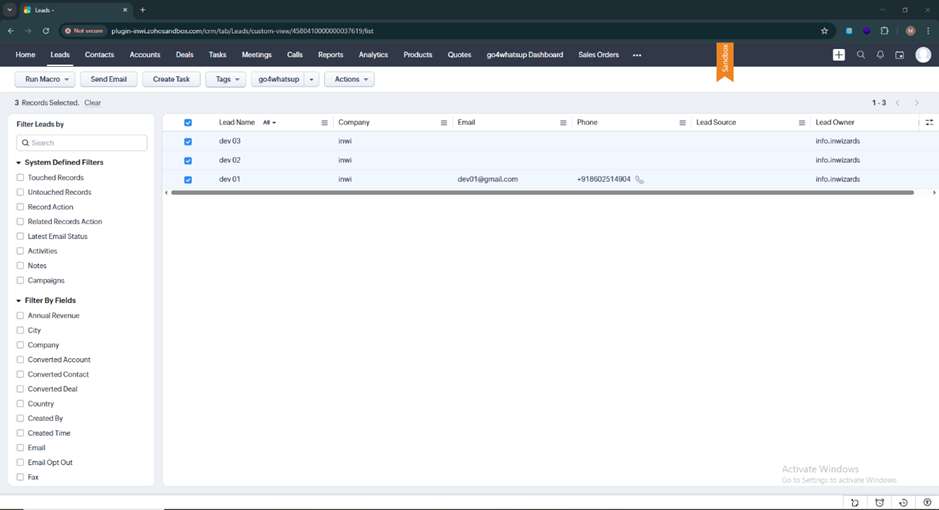
Step 2: Open a Lead Record
Navigate to the Leads module inside Zoho CRM.
Select one or multiple leads using filters.
You will now see the Go4WhatsUp button appear at the top of the page.
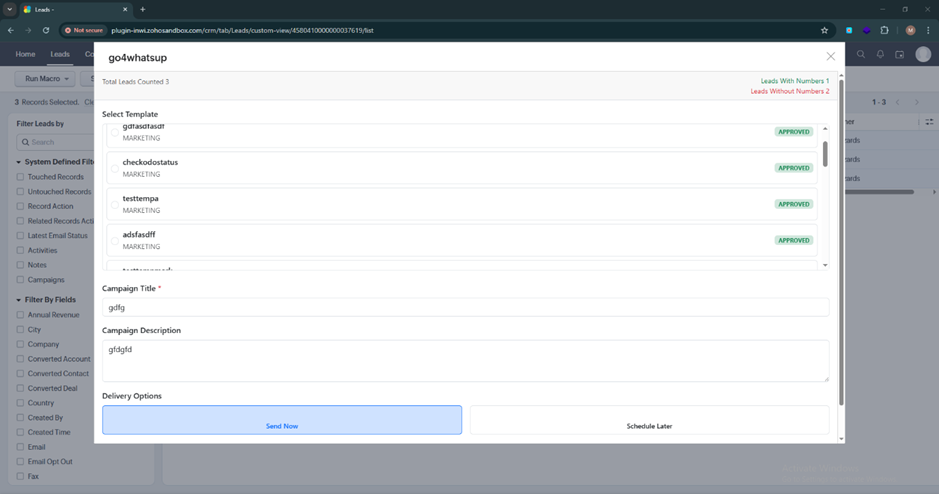
Step 3: Select a Template and Send Messages
Click the Go4WhatsUp button to open the messaging modal.
- If you are not logged in, complete the login process.
- If already logged in, choose a WhatsApp template.
- Fill in required dynamic fields.
- Broadcast to multiple leads at once.
This makes campaign execution extremely simple.
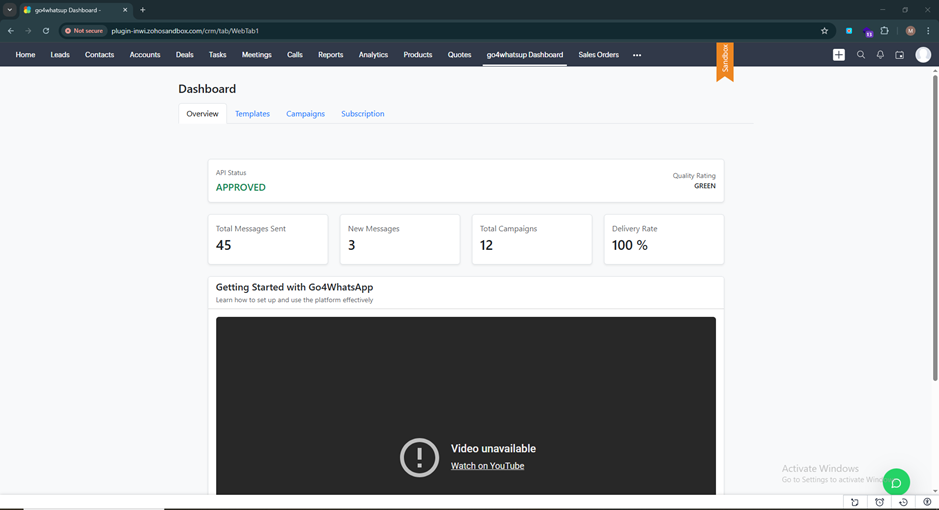
Step 4: View Dashboard Preview
After sending a broadcast, you will see a dashboard preview displaying:
- Message counts
- Delivery performance
- Engagement insights
This helps evaluate campaign performance instantly.
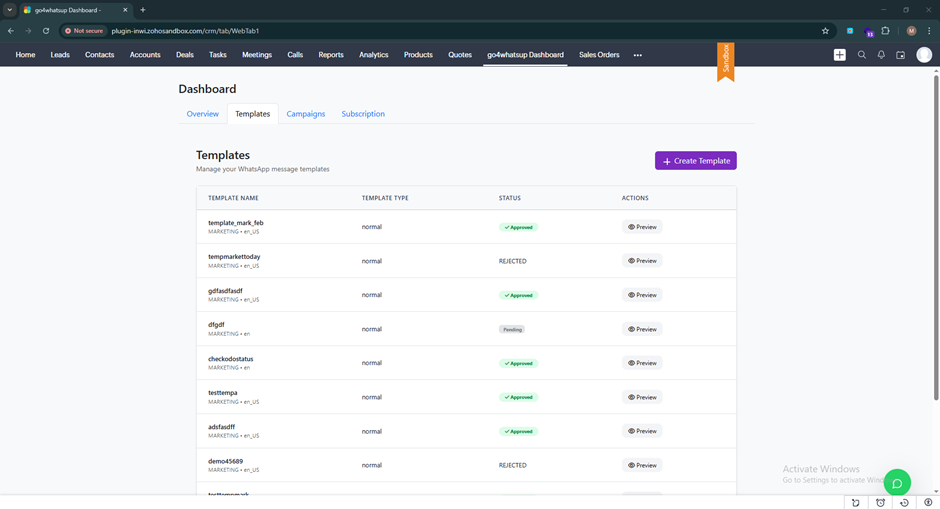
Step 5: Manage Templates
In the Templates section, you can:
- View existing templates
- Create new templates
- Submit templates for Meta approval
- Modify messaging structure
Templates ensure compliance and consistency.
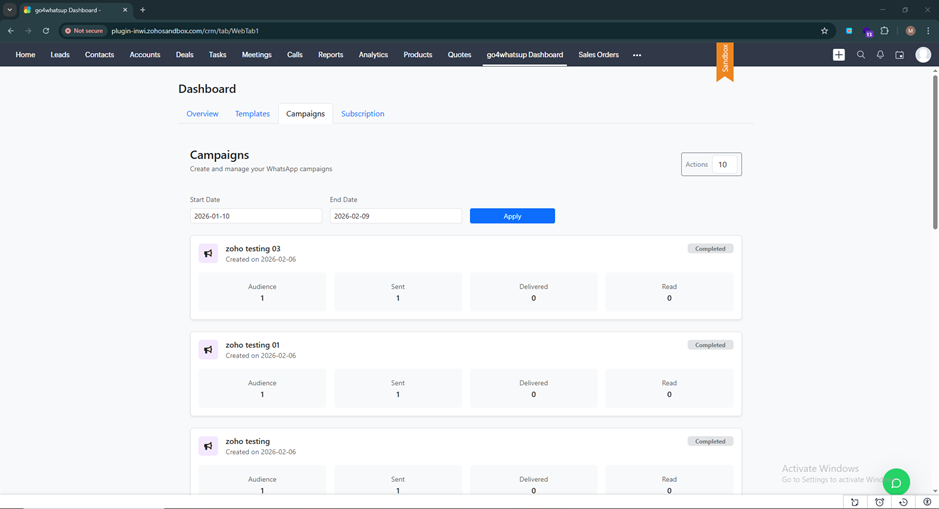
Step 6: Track Campaign Performance
The Campaigns section provides detailed analytics including:
- Total contacts reached
- Messages delivered
- Messages read
- Responses received
- Messages not sent
This gives marketing and sales leaders measurable insights.
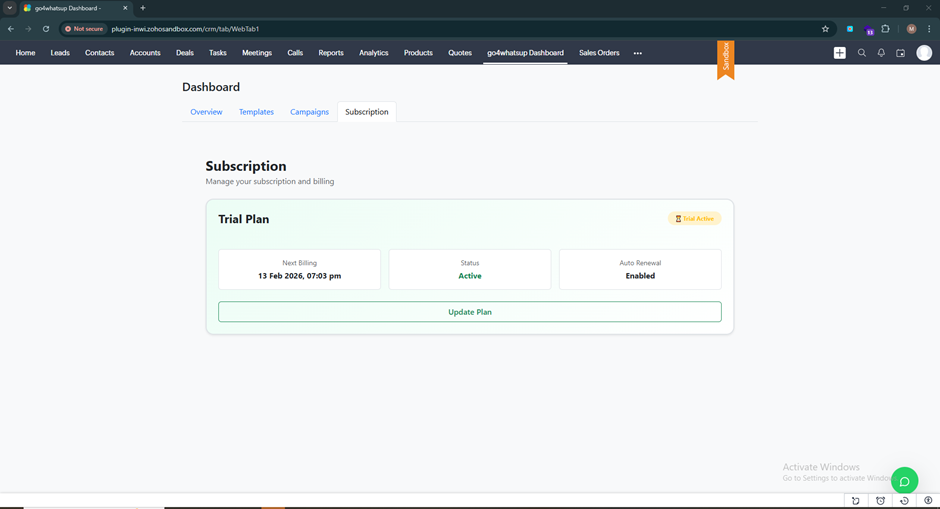
Step 7: Manage Subscription Details
In the Subscription section, you can view:
- Plan details
- Expiry date
- Next billing date
- Subscription status
This keeps billing transparent and easy to manage.
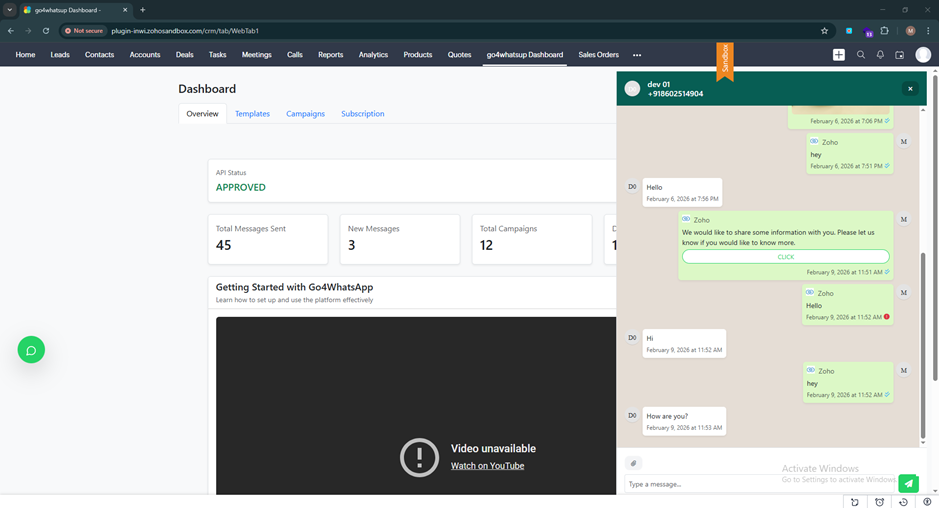
Step 8: Chat & Tag Conversations
The chat screen allows you to:
- Manage one-on-one conversations
- Add tags to contacts
- Categorize leads
- Prioritize conversations
Tags help segment leads for better targeting and reporting.
Step 9: Create an Account or Upgrade
If you don’t already have a Go4WhatsUp account:
- Create an account
- Choose a plan
- Activate 7-day free trial
- Log in with your Meta account
- Start sending broadcasts
The onboarding process is straightforward and business-friendly.
Use Cases Across Departments
For Sales Teams
- Instant lead follow-ups
- Personalized nurturing
- Deal reminders
- Proposal sharing
- Faster conversion cycles
For Marketing Teams
- Campaign broadcasts
- Product announcements
- Event invites
- Re-engagement campaigns
- Customer surveys
For Support Teams
- Ticket updates
- Issue resolution communication
- Service reminders
- Escalation management
How Go4WhatsUp Improves Productivity
Without integration:
- Sales teams manually copy numbers
- Conversations are scattered
- Follow-ups are missed
- Reports are incomplete
With Go4WhatsUp:
- Messaging happens inside CRM
- Conversations are auto-logged
- Reporting is accurate
- Teams save hours weekly
- Customer experience improves dramatically
This directly impacts revenue growth and operational efficiency.
Why Businesses Prefer Official WhatsApp API Over Regular WhatsApp
Using personal or regular WhatsApp for business creates risks:
- Account bans
- Lack of automation
- No analytics
- No team access
- No CRM integration
The official WhatsApp Business API provides:
- Verified business presence
- Higher message limits
- Template messaging
- Multi-user access
- CRM connectivity
- Automation capabilities
Go4WhatsUp leverages this official API to ensure compliance and scalability.
Security & Compliance
Because Go4WhatsUp uses the official WhatsApp Business API:
- Communication is secure
- Messages are encrypted
- Businesses stay compliant with Meta policies
- Opt-in tracking is maintained
- Customer data remains structured inside CRM
This is crucial for growing businesses handling large customer databases.
Real Business Impact
Companies using WhatsApp integration with CRM typically experience:
- Faster response times
- Higher engagement rates
- Improved follow-up accuracy
- Increased lead conversion
- Better campaign ROI
- Reduced operational workload
The integration becomes not just a communication tool—but a growth engine.
Final Thoughts
Zoho CRM is powerful on its own. But when combined with Go4WhatsUp’s official WhatsApp Business API integration, it becomes a complete communication powerhouse.
Instead of juggling tools and losing valuable context, your team can now:
- Engage leads instantly
- Run campaigns efficiently
- Track conversations automatically
- Improve productivity
- Scale customer communication seamlessly
If your business relies on Zoho CRM and wants to leverage WhatsApp as a serious growth channel, Go4WhatsUp is the missing piece.Start your 7-day free trial, integrate WhatsApp into Zoho CRM, and experience faster, smarter, and more scalable communication today.